
Have you checked these first?
Help us help you: include your environment details. We've made this easy for you. Use the Copy System Info button in Admin Panel › osAwesome › Diagnostics, then paste below.

Note: Never paste the contents of your ost-config.php file here; it holds your database credentials.
Two quick checks before posting: try clearing your browser cache, and press SHIFT+O on any Staff Panel page to enter Safe Mode (a stock osTicket with no enhancements). If the problem still shows in Safe Mode, it's in osTicket itself, not osTicket Awesome. But let us know about the issue either way.
Help us help you: include your environment details. We've made this easy for you. Use the Copy System Info button in Admin Panel › osAwesome › Diagnostics, then paste below.
This forum is public. Never post order numbers, full license keys, email addresses, or payment details.
This is the place for general questions about how billing and licensing work — renewals, activation, staging slots, plan differences, and what happens when a license lapses.
For anything tied to your specific account, refund, or payment, contact us directly instead.

Hi there,
I was wondering if there is any easy way to prevent (or change) the way tickets auto scroll when you click on them.
We use our tickets with a lot of internal fields and every time one is updated it scrolls to the bottom of the ticket.
I understand this is less of a theme thing so may not be possible - just prefer to use osTicket awesome before I do source code edits 🙂

As you probably realize, this is more of an osTicket question, rather than an osTicket Awesome question.
In any event, the easiest way to do this is with an edit to the source code.
Open /scp/js/thread.js and change line 20 from
scrollTo: function (entry) {
to
scrollTo: function (entry) { return;
Of course, the above mod would require that you reapply it any time you upgrade.
The only other option I am aware of is to install both the Attachment Preview plugin and the Prevent Autoscroll plugin.
Hey @Stevland
I recently updated all my systems and went to use this fix, however it doesn't seem to be working now. Any new ideas? I can try the plugins but I much prefered your code tweak 🙂

It does work perfectly. Have you tried clearing your browser cache?
Nope, sorry those are my only suggestions.
But again, this is actually an osTicket question. By asking it here you on have the potential of receiving a small fraction of the suggestions that you might receive if you asked in the osTicket Mods and Customizations forum.

Wanted to bump this as still good today in 2022. Only added the part in yellow at the end and it worked immediately.
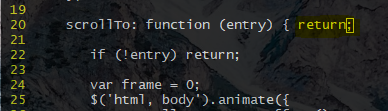

Just adding my 2c. It would be a nice option in osticketawesome, but the fix still works perfectly in 1.18.1 (osTicket-1.18.1-Awesome-101) 🙂