
Have you checked these first?
Help us help you: include your environment details. We've made this easy for you. Use the Copy System Info button in Admin Panel › osAwesome › Diagnostics, then paste below.

Note: Never paste the contents of your ost-config.php file here; it holds your database credentials.
Two quick checks before posting: try clearing your browser cache, and press SHIFT+O on any Staff Panel page to enter Safe Mode (a stock osTicket with no enhancements). If the problem still shows in Safe Mode, it's in osTicket itself, not osTicket Awesome. But let us know about the issue either way.
Help us help you: include your environment details. We've made this easy for you. Use the Copy System Info button in Admin Panel › osAwesome › Diagnostics, then paste below.
This forum is public. Never post order numbers, full license keys, email addresses, or payment details.
This is the place for general questions about how billing and licensing work — renewals, activation, staging slots, plan differences, and what happens when a license lapses.
For anything tied to your specific account, refund, or payment, contact us directly instead.

Hi there,
The little green dot that lets you know if there is a new message went missing a long time ago, I figured it would come back when I upgrade but I've just upgraded to the latest osTicket and latest Osta and it's still gone... any suggestions on how to get it back?

Hi,
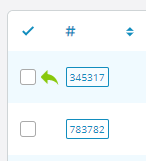
I think the green dot is replaced with a green arrow 😉
Do you have a screenshot? I'd say it's still missing for me because there's no green arrow either
Did you clear the browser cache?

I apologize for the late reply, @NIcholasjansen.
@darklord is correct, the New Reply icon is now a green arrow.
His advice to clear your browser cache was exactly what I would have suggested. But it sounds like it didn't fix your issue.
If you are still experiencing this issue please fill out this form and I will personally figure out what is going wrong.
(In this instance, I only need you to fill out the first two sections including osTicket Administrator Account. And then under Additional Instructions please add "New Reply icon missing" so I'll know it is you).
All done,
Are you using osTicket for that form? It's a lot nicer then what osTicket allows haha.
Hi @NIcholasjansen,
Just a quick note to let you know that I have received your form submission and I will look into this soon.
Okay I have figured out what is going on.
You moved your Ticket Queue columns around, but my code changes did not anticipate that and was not flexible enough to accommodate it.
But the fix is very simple!
Open /include/staff/templates/queue-tickets.tmpl.php.txt and look around line 335.
Change...
$( "div[style='font-weight:bold']" ).closest( "td" ).addClass( "new-reply-waiting" );
...to...
$( "div[style='font-weight:bold']" ).closest( "td.osta_ticket" ).addClass( "new-reply-waiting" );
...and you should now see the Reply Waiting icons. If not, clear your browser cache and try again.
Of course, I will also add this fix to all future 1.15.x releases.
---
To answer your other question, this website is built on WordPress and the form was built using the Gravity Forms plugin.
Perfect, that did the trick! Nice work mate 🙂
Much appreciated
Hi there,
I have just updated to 1.15.4 and it appears this has happened again, alas the green ticket has disappeared 🙁
I see the fix was integrated with the update but it doesn't appear to be working.
Can we get an update on this please?
Can we please get an update on this?