
Have you checked these first?
Help us help you: include your environment details. We've made this easy for you. Use the Copy System Info button in Admin Panel › osAwesome › Diagnostics, then paste below.

Note: Never paste the contents of your ost-config.php file here; it holds your database credentials.
Two quick checks before posting: try clearing your browser cache, and press SHIFT+O on any Staff Panel page to enter Safe Mode (a stock osTicket with no enhancements). If the problem still shows in Safe Mode, it's in osTicket itself, not osTicket Awesome. But let us know about the issue either way.
Help us help you: include your environment details. We've made this easy for you. Use the Copy System Info button in Admin Panel › osAwesome › Diagnostics, then paste below.
This forum is public. Never post order numbers, full license keys, email addresses, or payment details.
This is the place for general questions about how billing and licensing work — renewals, activation, staging slots, plan differences, and what happens when a license lapses.
For anything tied to your specific account, refund, or payment, contact us directly instead.

After a couple of posts the posts starts to glitch out to the left:
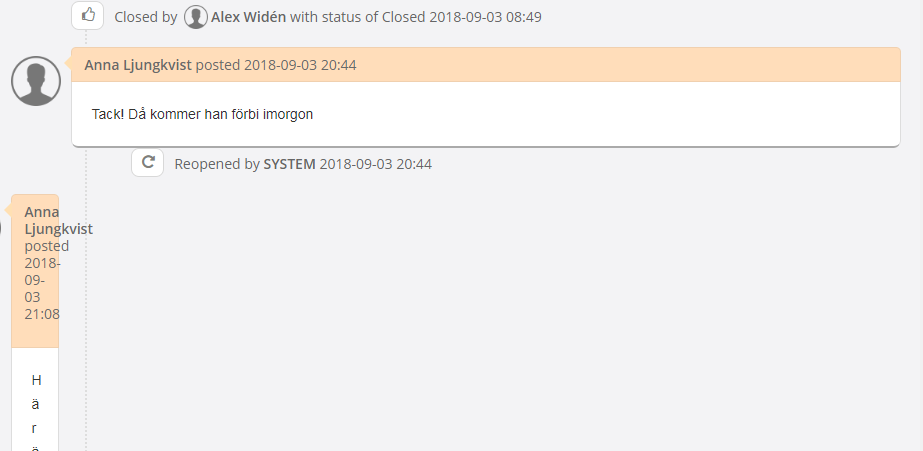
I updated to osTicket-Awesome-1.10.4-v.1.0 but the poblem is still there, i have not yest found a solution for this so any fix or work around would be much appreciated.
i found a workaround so u can at least read the text:
ost/assets/default/css/theme.css
line 1052
Change display to inline:
.thread-entry > .avatar {<br />
margin-left: -60px;<br />
display:inline;<br />
width:48px;<br />
height:auto;<br />
border-radius: 5px;<br />
}
This does not make it show as a bubble in a bubble but u can read the text, a prettier solution would be nice

Thank you for taking the time to post this and also the fix that you came up with.
Oddly, I can't seem to reproduce your issue though.
Looking at the demo installation, for example, here is a ticket with many replies and it displays as expected.
I wonder what is unique about your installation or browser?
In any event, I'm glad that you've got it sorted.
BTW you might want to add CSS tweaks such as this to /osta/user-styles.css
This style sheet is the last one to load, so anything added here will override any other CSS styles.
The main advantage though is that you can keep your edits segregated... which will make them easy to manage if/when you upgrade to a new version of osTicket Awesome! 🙂
user-styles.css i a nice thing will try this att next upgrade, so we don't have to redo all the css every time we upgrade 🙂