
Have you checked these first?
Help us help you: include your environment details. We've made this easy for you. Use the Copy System Info button in Admin Panel › osAwesome › Diagnostics, then paste below.

Note: Never paste the contents of your ost-config.php file here; it holds your database credentials.
Two quick checks before posting: try clearing your browser cache, and press SHIFT+O on any Staff Panel page to enter Safe Mode (a stock osTicket with no enhancements). If the problem still shows in Safe Mode, it's in osTicket itself, not osTicket Awesome. But let us know about the issue either way.
Help us help you: include your environment details. We've made this easy for you. Use the Copy System Info button in Admin Panel › osAwesome › Diagnostics, then paste below.
This forum is public. Never post order numbers, full license keys, email addresses, or payment details.
This is the place for general questions about how billing and licensing work — renewals, activation, staging slots, plan differences, and what happens when a license lapses.
For anything tied to your specific account, refund, or payment, contact us directly instead.

Dear fellow devs!
I'm using osTicketAwesome in Hungarian and some texts remain in English on the landing page:
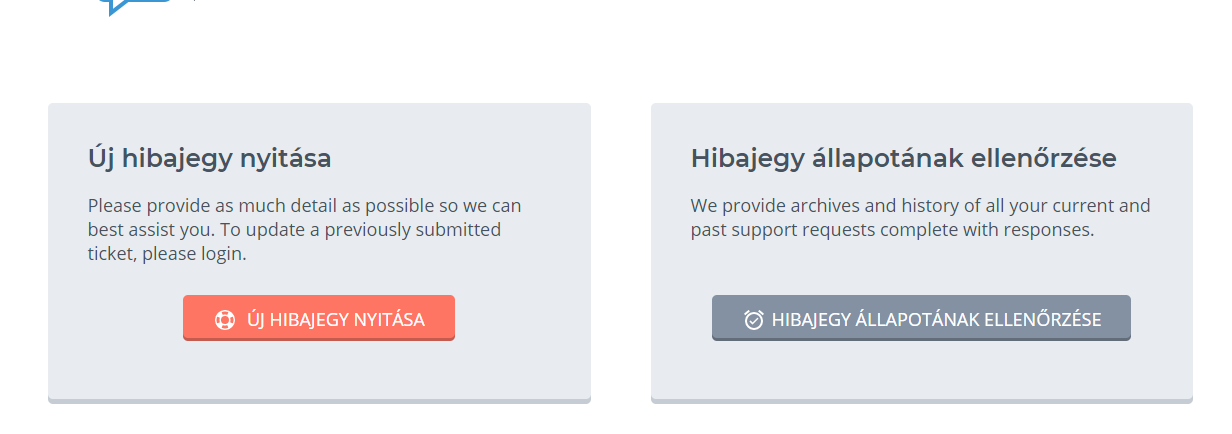
My system parameters are below:
osTicket v1.14.2 // osTicket-1.14.2-Awesome-103
PHP 7.4.8 // MySQL 10.1.45 // Apache web server
Could you help, please?

Oh, that really weird. It works on this end:
https://osticketawesome.com/a/1.14.2-3/?lang=hu
Have you tried clearing your browser cache?
Hmm, it really is weird...I have not cleared cache, but I will give it a go, and see what happens.
Unfortunately clearing cache did not solve anything 🙁
Are you using the Hungarian language pack that came with osTicket Awesome?
One easy way to fix this would be to open /index.php replace line 76...
<?php echo __('We provide archives and history of all your current and past support requests complete with responses.');?>
...with your own Translated text.
But I would be curious to take a look at your installation and figure out what the actual issue is, if you would be comfortable providing me with temporary access.
If so, please fill out this form with as much information as possible. (I won't need an osTicket Administrator account for this, but I will need at least one connection method: cPanel/Plesk, FTP or SSH).
Thank you, I submitted the form for you.
Thank you for doing that. I will have a look in the next few hours and report back.
Wow. I honestly don't know what the problem was. All of your files are intact. I couldn't find any reason that those translations shouldn't work.
There are two very small possibilities that come to mind.
I wonder if you are running any caching software on your server, in order to speed things up? Sometimes caching software can conflict with osTicket's translation functions.
I also notice that you are running PHP 7.4. You should consider downgrading to 7.3 as osTicket does not yet support 7.4 and running it can cause weird things to happen.
In the end I had to give up trying to understand this issue and I simply hard-coded the translations into the /index.php file for you.
In the future after you upgrade if those translations stop working again copy /support-old/index.php to /support and you'll be good-to-go.
Dear Stevland!
Thank you for your efforts. Due to other plugins it is not an option to downgrade to php 7.3, but this hardcoded solution is more than good for us for the time being.

Hello,
I have a similar problem with the german translation.
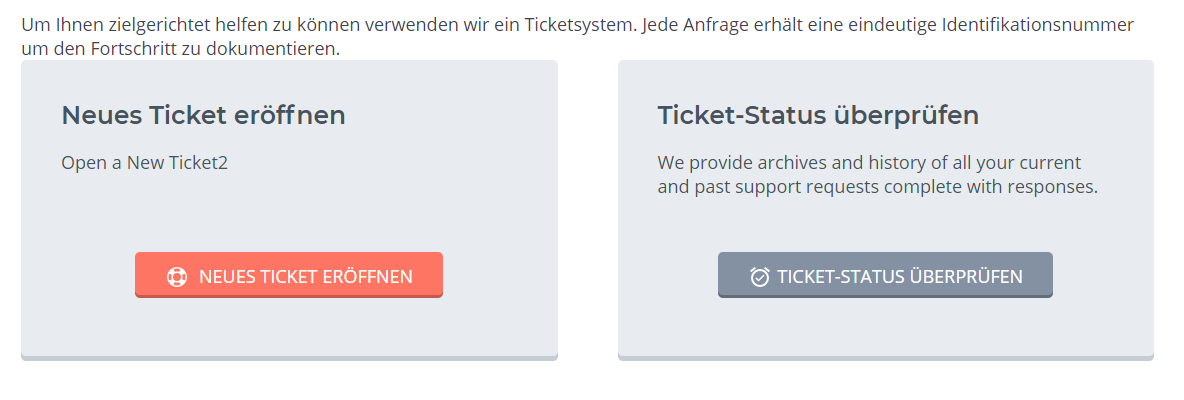
The texts are not translated, similar to the hungarian version. I tried to add a custom translation and added this line to
include\i18n\de\LC_MESSAGES\messages.mo.php
'Create New Ticket2' => 'Neues Ticket eröffnen',
But its not recognized as a new translation (as you can see in the screenshot). I downgraded to php 7.3 as you recommended, but its the same result.
Can you help me?
Thank you very much!
I can provide you SFTP access

Hey jotek,
I dont understand, why you edited the source (Create New Ticket2), don't do that. Change that back to "Create New Ticket"
You can fix this very easy by yourself - you were already on the right track (/include/i18n/de/LC_MESSAGES/messages.mo.php):

- Should be line 1739 = 'Open a New Ticket' => 'deine Übersetzung hier',
- Should be line 154 = 'Please provide as much detail as possible so we can best assist you. To update a previously submitted ticket, please login.' =>'deine andere Übersetzung hier‘,