

I apologize for the late reply, @NIcholasjansen.
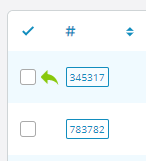
@darklord is correct, the New Reply icon is now a green arrow.
His advice to clear your browser cache was exactly what I would have suggested. But it sounds like it didn't fix your issue.
If you are still experiencing this issue please fill out this form and I will personally figure out what is going wrong.
(In this instance, I only need you to fill out the first two sections including osTicket Administrator Account. And then under Additional Instructions please add "New Reply icon missing" so I'll know it is you).

All done,
Are you using osTicket for that form? It's a lot nicer then what osTicket allows haha.
Hi @NIcholasjansen,
Just a quick note to let you know that I have received your form submission and I will look into this soon.
Okay I have figured out what is going on.
You moved your Ticket Queue columns around, but my code changes did not anticipate that and was not flexible enough to accommodate it.
But the fix is very simple!
Open /include/staff/templates/queue-tickets.tmpl.php and look around line 335.
Change...
$( "div[style='font-weight:bold']" ).closest( "td" ).addClass( "new-reply-waiting" );
...to...
$( "div[style='font-weight:bold']" ).closest( "td.osta_ticket" ).addClass( "new-reply-waiting" );
...and you should now see the Reply Waiting icons. If not, clear your browser cache and try again.
Of course, I will also add this fix to all future 1.15.x releases.
---
To answer your other question, this website is built on WordPress and the form was built using the Gravity Forms plugin.
Perfect, that did the trick! Nice work mate 🙂
Much appreciated