
Have you checked these first?
Help us help you: include your environment details. We've made this easy for you. Use the Copy System Info button in Admin Panel › osAwesome › Diagnostics, then paste below.

Note: Never paste the contents of your ost-config.php file here; it holds your database credentials.
Two quick checks before posting: try clearing your browser cache, and press SHIFT+O on any Staff Panel page to enter Safe Mode (a stock osTicket with no enhancements). If the problem still shows in Safe Mode, it's in osTicket itself, not osTicket Awesome. But let us know about the issue either way.
Help us help you: include your environment details. We've made this easy for you. Use the Copy System Info button in Admin Panel › osAwesome › Diagnostics, then paste below.
This forum is public. Never post order numbers, full license keys, email addresses, or payment details.
This is the place for general questions about how billing and licensing work — renewals, activation, staging slots, plan differences, and what happens when a license lapses.
For anything tied to your specific account, refund, or payment, contact us directly instead.

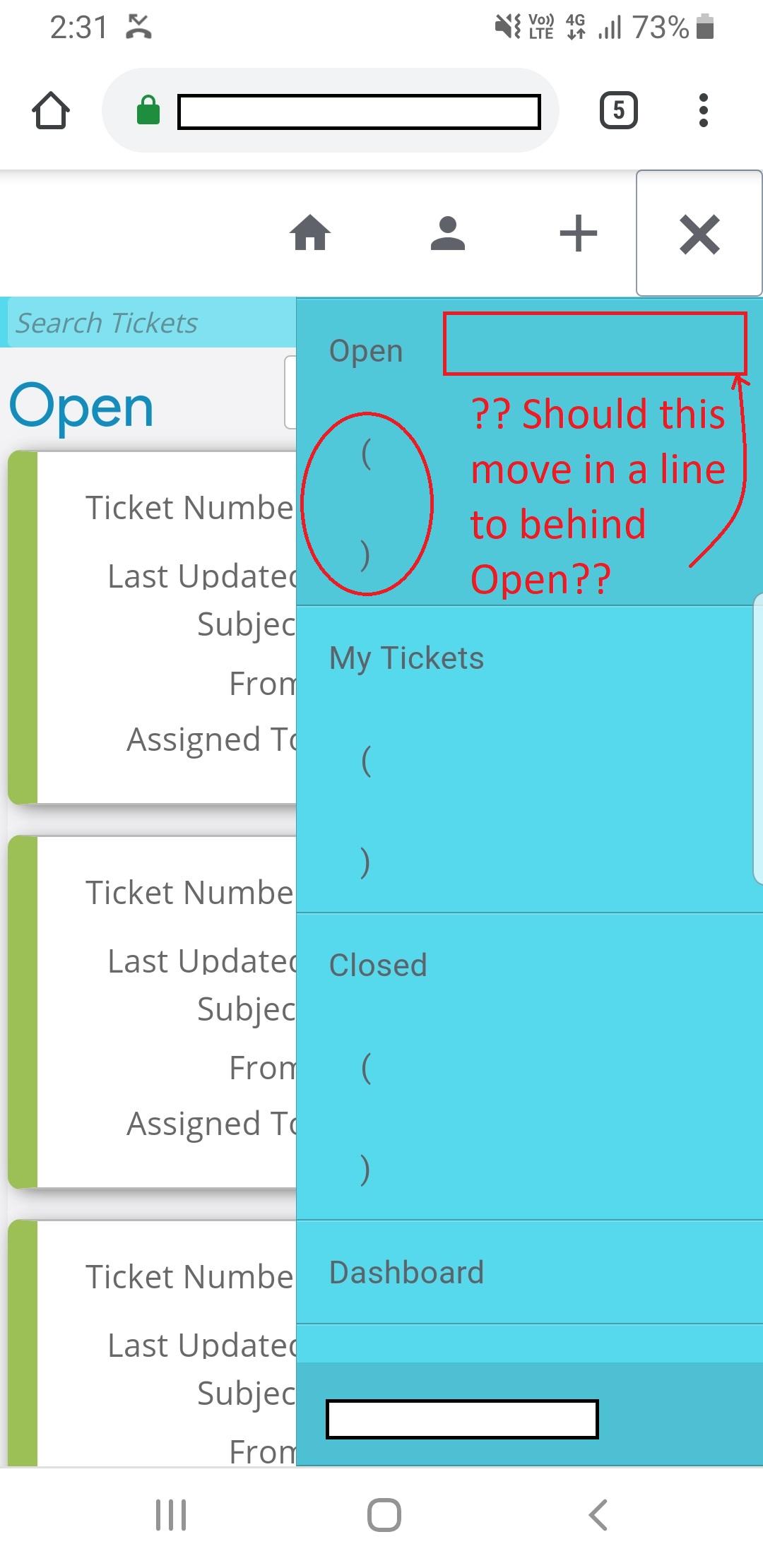
Just checked on my Samsung "Internet" App and the same display problem. Is this meant to show a number of tickets "Open" "Closed" etc??

This same display glitch was reported once before by a user in the osTicket.com forum. He later claimed that the issue was resolved, although I wasn't confident that it was because I didn't do anything to address it. I can't reproduce it on my end.
If you would consider giving me access to your installation to have a look I sure would appreciate it.
If yes, I will need you to create a temporary agent account (Admin Panel > Agents > Add New Agent) using info@osticketawesome.com. Be sure to give the account full administrative privileges.
Thank you for providing access, @techcare.
I noticed something else that seems to be related. In the desktop layout when I click on a navigation link, for a moment the ticket counts (in brackets) appear on the screen.

Those ticket counts were displayed in earlier versions of osTicket, but they definitely shouldn't display in osTicket v1.12 (or osTicket Awesome for that matter).
Can you think of anything unique about how you installed osTicket Awesome, or some setting that you have configured, that may account for this behavior?
Now I am wondering if you will grant me FTP access to have a look around on that side of things?
No drama mate.
Yeah the main difference is that I needed something fixed in osTicket v1.12 and the dev's instructed me to use the latest git version. So I did and I think it is running that ATM.
Do you think that is the problem?
Hmmm I wouldn't think so but I'm not really sure.
FTP?
I'll send through as soon as I have made them. Been busy lately so will be soon. Cheers for the help mate!!
G'day @stevland,
Have you managed to take a look? I sent the FTP details a few days ago.
Cheers,
Steve
Fixed!<br />
<br />
If anyone else has this issue, the quick fix:<br />
<br />
Admin Panel > Settings > Tickets > Settings > Top-Level Ticket Counts: uncheck<br />
<br />
The next release will fix this permanently.