
Have you checked these first?
Help us help you: include your environment details. We've made this easy for you. Use the Copy System Info button in Admin Panel › osAwesome › Diagnostics, then paste below.

Note: Never paste the contents of your ost-config.php file here; it holds your database credentials.
Two quick checks before posting: try clearing your browser cache, and press SHIFT+O on any Staff Panel page to enter Safe Mode (a stock osTicket with no enhancements). If the problem still shows in Safe Mode, it's in osTicket itself, not osTicket Awesome. But let us know about the issue either way.
Help us help you: include your environment details. We've made this easy for you. Use the Copy System Info button in Admin Panel › osAwesome › Diagnostics, then paste below.
This forum is public. Never post order numbers, full license keys, email addresses, or payment details.
This is the place for general questions about how billing and licensing work — renewals, activation, staging slots, plan differences, and what happens when a license lapses.
For anything tied to your specific account, refund, or payment, contact us directly instead.

When I upload attachments to a ticket and try to download them again, they get corrupted if the original file is binary (images or Microsoft Office documents). Text documents and PDFs are fine.
This is the same issue as described here: https://osticketawesome.com/forums/topic/attachments-corrupt/
I'm not sure if this issue here is the same ( https://osticketawesome.com/forums/topic/user-attachment-not-work/) but the solution posted in that thread did not work for me.
When I revert back to the old design I can upload and download the files again. The files that were uploaded before stay corrupt so I think they break during the upload procedure.

Hmmm. What version of osTicket / osTicket Awesome are you using?
FYI I just uploaded and downloaded a bunch of files and opened them successfully using osTicket Awesome v1.11-1.0. I tested using.docx, .doc, .xlsx, .png and .jpg files.
If you would like me to look into this for you I will need you to create a temporary agent account (Admin Panel > Agents > Add New Agent) using info@osticketawesome.com. Be sure to give the account full administrative privileges.
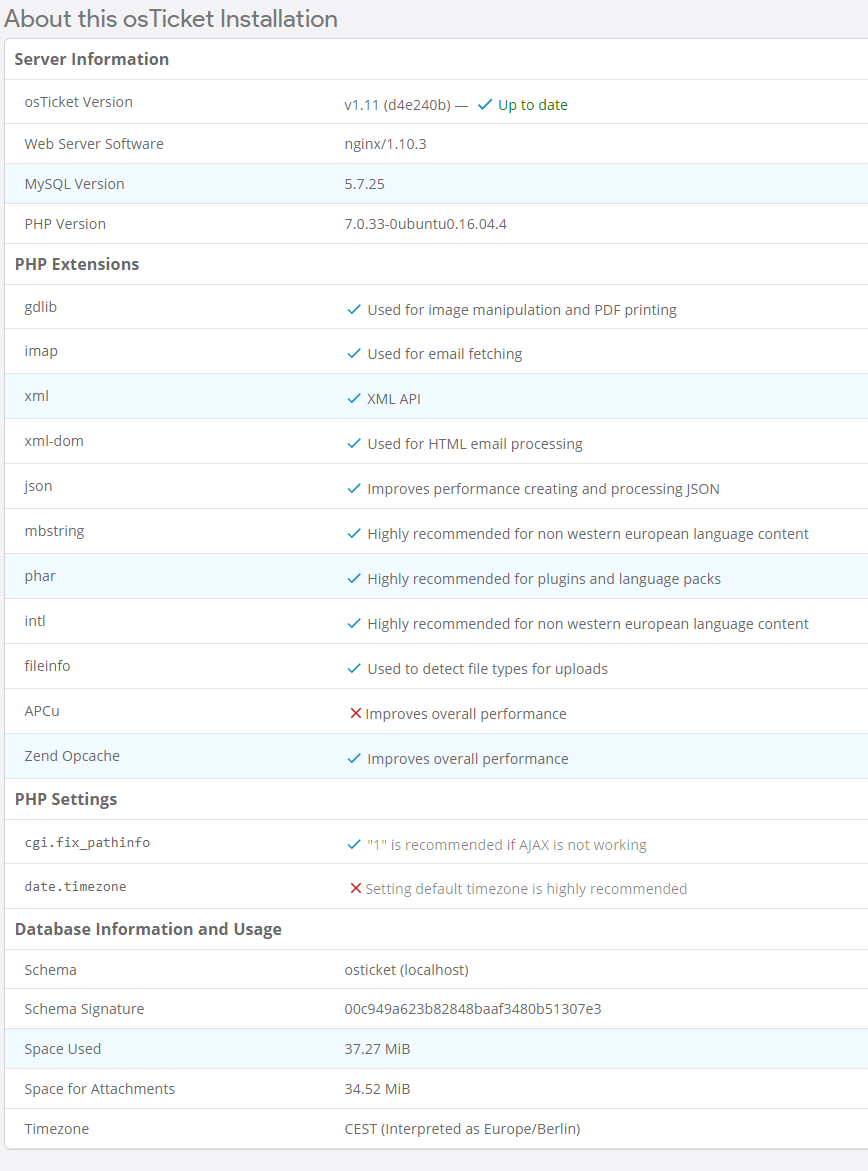
We use v1.11 (d4e240b). I attached a Screenshot with additional information.
If possible I would like to do that as a last resort because I would have to create an AWS instance. At the moment the ticketsystem is only internal and is also only reachable internally.
Hi Stevland
Would it be possible to do a teamviewer session? I tried to create an AWS instance from my backup but the environment there is different from our local installation and I don't know if that affects things.
Thanks in advance
I'd be willing to do that, but please upgrade to osTicket-1.12-Awesome-101 first.
I would estimate that the probability that your issue will be resolved by upgrading is around 90%.
Let me know. Thanks.
Hey Stevland
I didn't even realise you pushed out a new version. I updated to osTicket 1.12 and the newest osTicketAwesome version and so far (at least on my test system) it looks like it's working. I would contact you again if another issue would pop up.
Thanks for your support.
That's great, glad its sorted.