
Have you checked these first?
Help us help you: include your environment details. We've made this easy for you. Use the Copy System Info button in Admin Panel › osAwesome › Diagnostics, then paste below.

Note: Never paste the contents of your ost-config.php file here; it holds your database credentials.
Two quick checks before posting: try clearing your browser cache, and press SHIFT+O on any Staff Panel page to enter Safe Mode (a stock osTicket with no enhancements). If the problem still shows in Safe Mode, it's in osTicket itself, not osTicket Awesome. But let us know about the issue either way.
Help us help you: include your environment details. We've made this easy for you. Use the Copy System Info button in Admin Panel › osAwesome › Diagnostics, then paste below.
This forum is public. Never post order numbers, full license keys, email addresses, or payment details.
This is the place for general questions about how billing and licensing work — renewals, activation, staging slots, plan differences, and what happens when a license lapses.
For anything tied to your specific account, refund, or payment, contact us directly instead.

Greetings! We can't seem to get quick filters to display on the main ticket queue lists. Is there a special place on/in the UI we should be looking? Thanks!

After all of these years I still feel like I'm just scratching the surface of osTicket's capabilities.
I have never known about Quick Filters, until now.
Anyway, for my first attempt trying to add a Quick Filter, I added Department to the Open queue. Nothing happened. I checked my vanilla copy of osTicket, still nothing.
So I tried adding Priority Level as a Quick Filter in the My Tickets queue. Bingo! It shows up as a button with a drop down menu.
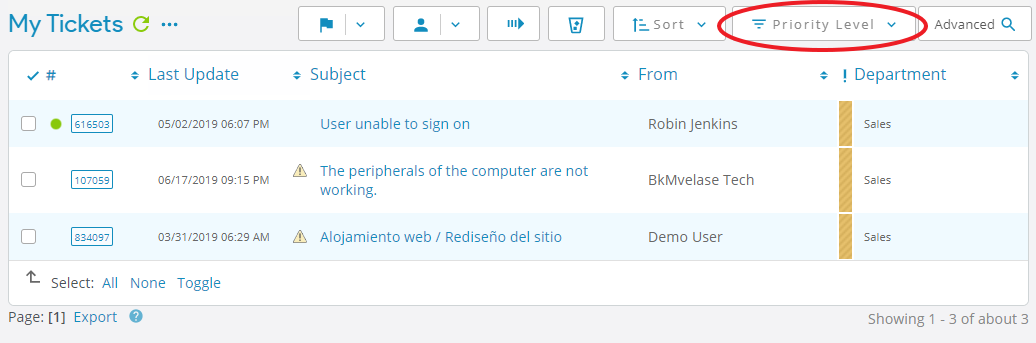
Therefore, I surmise that some Quick Filters work and others do not. And for those that do not appear, it is an osTicket quirk and not an osTicket Awesome issue.
Fascinating - after your post we did some quick additional tinkering and basically noticed the same behavior (some filters appear, others do not). Thank you for the quick reply!
An update! After tinkering a bit we have found that adding Quick Filters to the default queues installed with OSTicket does not work reliably BUT if you create a new custom queue, the quick filters seem to show up there consistently. For example - we ended up creating a fresh "Open" queue, retiring the one installed with the system, and now quick filters work there like a champ.
Hope this is helpful for anyone else interested in having this function available.
Good to know. Thanks for sharing your findings.

Vos crees que este problema je tengo puédale venir por los mismos que te paso con los filtros? https://osticketawesome.com/forums/topic/delay-en-acceso-a-base-de-datos/
gracias