Have you checked these first?
Help us help you: include your environment details. We've made this easy for you. Use the Copy System Info button in Admin Panel › osAwesome › Diagnostics, then paste below.

Note: Never paste the contents of your ost-config.php file here; it holds your database credentials.
Two quick checks before posting: try clearing your browser cache, and press SHIFT+O on any Staff Panel page to enter Safe Mode (a stock osTicket with no enhancements). If the problem still shows in Safe Mode, it's in osTicket itself, not osTicket Awesome. But let us know about the issue either way.
Help us help you: include your environment details. We've made this easy for you. Use the Copy System Info button in Admin Panel › osAwesome › Diagnostics, then paste below.
This forum is public. Never post order numbers, full license keys, email addresses, or payment details.
This is the place for general questions about how billing and licensing work — renewals, activation, staging slots, plan differences, and what happens when a license lapses.
For anything tied to your specific account, refund, or payment, contact us directly instead.

Buenas tardes, quisiera saber como puedo cambiar los colores que tienen en la prioridad del DEMO?


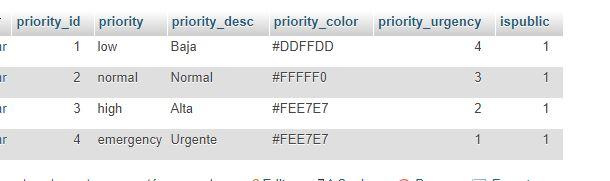
Mi tabla ost__tickets_priority es:

Gracias
Desde el celular se ven de un color y desde la pc de otro, porque puede ser?
 <br />
<br />
Alguien me puede dar una mano con este tema? Gracias

Sorry for the late reply.
Mi tabla ost__tickets_priority es:
osTicket Awesome overrides those settings. The priority colors are set by CSS instead. If you want to change them, add the following to /osta/user-styles.css:
td.osta_priority.osta_priority_emergency {
background: url(../img/priority-pattern-overlay.png) #fc6872!important;
}
td.osta_priority_high {
background: url(../img/priority-pattern-overlay.png) #e5bc61!important;
}
td.osta_priority_normal {
background: url(../img/priority-pattern-overlay.png) #a5cb59!important;
}
td.osta_priority_low {
background: url(../img/priority-pattern-overlay.png) #5bb3f5!important;
}
Now you can change the colors to whatever you desire.
Desde el celular se ven de un color y desde la pc de otro, porque puede ser?
I'm not sure what is going on. That is what closed tickets should look like. Perhaps you broke something accidentally while trying to change the priority colors.
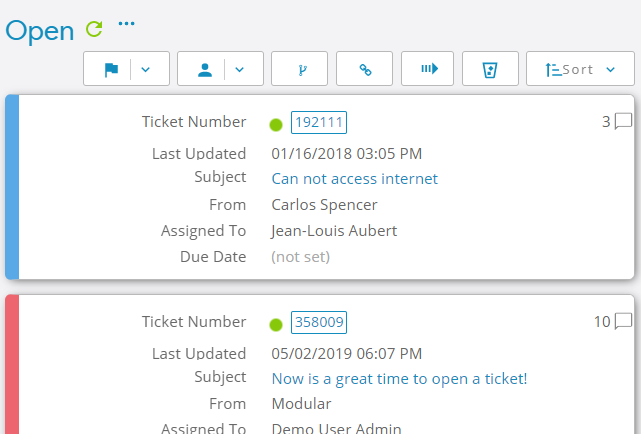
Priority colors do work in osTicket Awesome's mobile layout, as you can see: