
Have you checked these first?
Help us help you: include your environment details. We've made this easy for you. Use the Copy System Info button in Admin Panel › osAwesome › Diagnostics, then paste below.

Note: Never paste the contents of your ost-config.php file here; it holds your database credentials.
Two quick checks before posting: try clearing your browser cache, and press SHIFT+O on any Staff Panel page to enter Safe Mode (a stock osTicket with no enhancements). If the problem still shows in Safe Mode, it's in osTicket itself, not osTicket Awesome. But let us know about the issue either way.
Help us help you: include your environment details. We've made this easy for you. Use the Copy System Info button in Admin Panel › osAwesome › Diagnostics, then paste below.
This forum is public. Never post order numbers, full license keys, email addresses, or payment details.
This is the place for general questions about how billing and licensing work — renewals, activation, staging slots, plan differences, and what happens when a license lapses.
For anything tied to your specific account, refund, or payment, contact us directly instead.

Latest update. Now unable to see the collaborators interface. I click on it and all I see is that the page scroll bar moves (page becomes bigger). That is it.
No php error (web server side)
Appears to be a z-index issue??
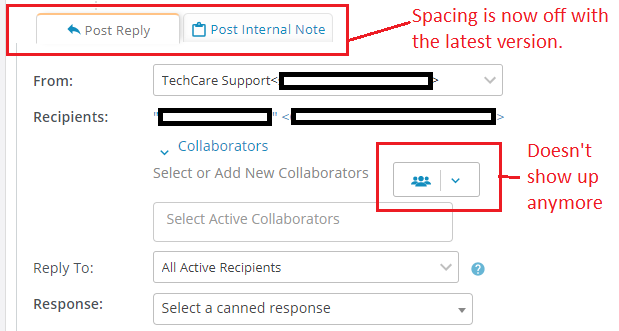

By "latest update" I assume you mean osTicket-1.12-Awesome-105, yes?
Please clear your browser cache and try again.
If the issue persists, let me know if you encounter the same issues in the latest staff demo.
Oops sorry disregard my last message!
I got confused. I fixed this recently and I mistakenly thought the fix had been included in the last release. It was fixed since the last release, hence it will be included in the next release.
No drama dude. But this is a pretty big issue for me. What is the ETA for the new release? I've had to resort back to the standard osTicket theme.
Why this shows up as resolved when it isn't???
Please fix this!!
Hmmm it is still marked as "support request" on my end. Actually I've changed it to "in progress".
I just released 105. I have no immediate plans or schedule for the next release. I will try to tailor something for you soon.
Yeah I changed it when I posted last time. Interesting.
Understood mate. But without this working I'm back to the original osticket non responsive theme. Doesn't any one else have this issue?

I have the same issue.. Driving me nuts
Hey guys... please upgrade to osTicket-1.12.2-Awesome-101 to resolve this issue.
alright.. it works.. just tested.. thank you
Works for me too. Thank you.