
Have you checked these first?
Help us help you: include your environment details. We've made this easy for you. Use the Copy System Info button in Admin Panel › osAwesome › Diagnostics, then paste below.

Note: Never paste the contents of your ost-config.php file here; it holds your database credentials.
Two quick checks before posting: try clearing your browser cache, and press SHIFT+O on any Staff Panel page to enter Safe Mode (a stock osTicket with no enhancements). If the problem still shows in Safe Mode, it's in osTicket itself, not osTicket Awesome. But let us know about the issue either way.
Help us help you: include your environment details. We've made this easy for you. Use the Copy System Info button in Admin Panel › osAwesome › Diagnostics, then paste below.
This forum is public. Never post order numbers, full license keys, email addresses, or payment details.
This is the place for general questions about how billing and licensing work — renewals, activation, staging slots, plan differences, and what happens when a license lapses.
For anything tied to your specific account, refund, or payment, contact us directly instead.

Hi,
in staff-desktop.css is an animation (bounceIn) for messages (see line "#msg_info, #msg_notice, #msg_warning, #msg_error, .success-banner, .notice-banner"). These messages appear at the end of a ticket thread prior to the reply-section. Now, when there is such a message and you have a one-liner notice / answer above AND it is yours, you get 3 (instead of 2 options) in the entry dropdown: edit, create ticket, create task. Since the animated message gets opacity of 1 and has no position flag (so it's static), it seems to break all z-indexes so that you can't click on the last entry in the dropdown list.
To make it more visible I changed opacity to 0.5 and made a screenshot from the staff demo.
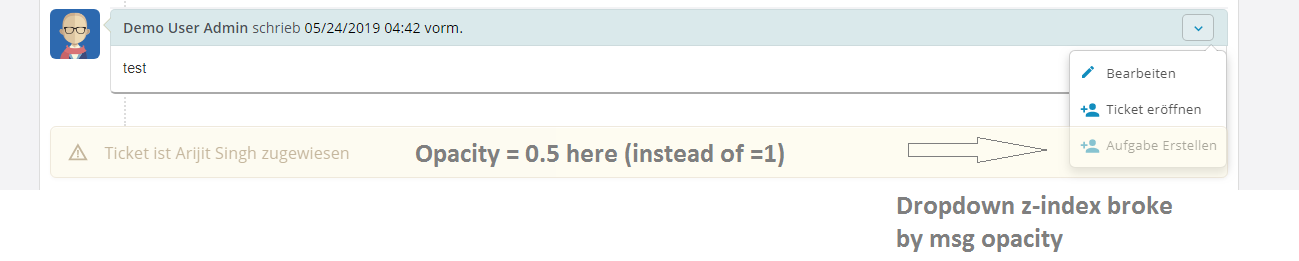
I just removed the whole animation and we can live without it. Maybe you want to fix that in the next release...

Thank you for the report. I can't figure out what steps to take in order to reproduce this glitch. Do you run into this very often?
- Go into a Ticket and produce anything that leads to a message at the end of a ticket thread. For instance, assign it to anybody so that there appears the message "Ticket is assigned to xy"
- After assigning the Ticket, just add an internal note with only one line of text <br />
Now your one line of inernal note should be directly above the message "Ticket is assigned to xy" - Now use the internal note to create a new task from it. Therefor, you open the small dropdown menu on the right.
Since the message "Ticket is assigned to xy" has an opacity = 1 (and position = static) it seems to break all z-indexes. So you can't create a task from the note, because it's behind the message. That's it.
I can't say if it happed "very often". I removed the animation. There is just a small amount of agents using osTicket here so far and they all use the "Create task" from a thread entry quiet often. It's hard to say how often it wasn't possible because of an animated message breaking the z-index...
I really appreciate the detailed instructions. I now see what you are referring to. It is an odd one. Short of removing the animation as you've suggested, I can't figure out a fix just yet. The next release is (hopefully) dropping today, but I'll keep working on a fix for this one.
I finally found a fix for this! It will be included in osTicket-1.12-Awesome-105.
Thanks again for the detailed report.