
Have you checked these first?
Help us help you: include your environment details. We've made this easy for you. Use the Copy System Info button in Admin Panel › osAwesome › Diagnostics, then paste below.

Note: Never paste the contents of your ost-config.php file here; it holds your database credentials.
Two quick checks before posting: try clearing your browser cache, and press SHIFT+O on any Staff Panel page to enter Safe Mode (a stock osTicket with no enhancements). If the problem still shows in Safe Mode, it's in osTicket itself, not osTicket Awesome. But let us know about the issue either way.
Help us help you: include your environment details. We've made this easy for you. Use the Copy System Info button in Admin Panel › osAwesome › Diagnostics, then paste below.
This forum is public. Never post order numbers, full license keys, email addresses, or payment details.
This is the place for general questions about how billing and licensing work — renewals, activation, staging slots, plan differences, and what happens when a license lapses.
For anything tied to your specific account, refund, or payment, contact us directly instead.

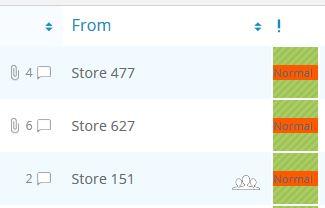
Hey Stevland, Upon doing a fresh install of OSTicket 1.12 - Awesome 102, the Priority Column seems to be expanded and shows the Priorities text instead of just the color and pattern. Is there a way to remove this so only the color shows like normal?
Example:<br />

Did that fix it for ya?
No, Still showing up after clearing cache. This is happening on multiple browsers and on multiple agents computers. Is there a file or setting that handles that column and Priority levels that could be messed up?
Two options to fix this:
1. Please try upgrading to the latest version (Revision 103), which will hopefully be released later on today
OR
2. If you would like me to look into this for you I will need you to create a temporary agent account (Admin Panel > Agents > Add New Agent) using info@osticketawesome.com. Be sure to give the account full administrative privileges.
Have you resolved this?
Hey Stevland
After upgrading to 103 I still had the text error. After looking through all of the files, I noticed that a few OSTicket versions ago we change the default Low, Normal, High, Emergency levels to custom ones. I noticed that OSTicket Awesome pulls the color only for the specific default levels. After setting the levels back to the default in the database, the priority column correctly showed the color and removed the text.
Thanks,
Ah ha! I never would have thought of that, @biggby. Thank you for taking the time to come back and explain. Perhaps it will come up again one day.