
Have you checked these first?
Help us help you: include your environment details. We've made this easy for you. Use the Copy System Info button in Admin Panel › osAwesome › Diagnostics, then paste below.

Note: Never paste the contents of your ost-config.php file here; it holds your database credentials.
Two quick checks before posting: try clearing your browser cache, and press SHIFT+O on any Staff Panel page to enter Safe Mode (a stock osTicket with no enhancements). If the problem still shows in Safe Mode, it's in osTicket itself, not osTicket Awesome. But let us know about the issue either way.
Help us help you: include your environment details. We've made this easy for you. Use the Copy System Info button in Admin Panel › osAwesome › Diagnostics, then paste below.
This forum is public. Never post order numbers, full license keys, email addresses, or payment details.
This is the place for general questions about how billing and licensing work — renewals, activation, staging slots, plan differences, and what happens when a license lapses.
For anything tied to your specific account, refund, or payment, contact us directly instead.

Hi,
I've noticed that [Admin Panel / Staff Panel] toggle button is missing when viewing on mobile phone.

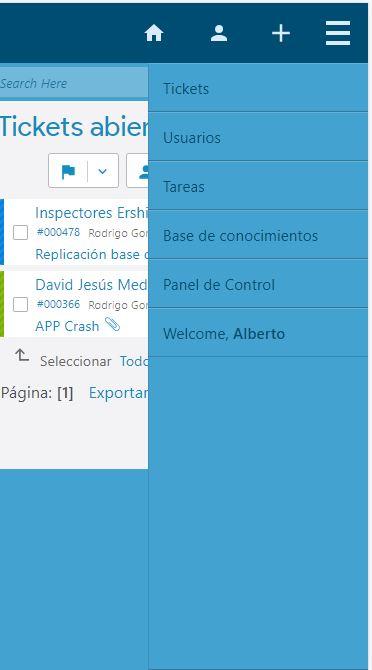
Regards

You are correct, @aeromarine.
The Admin Panel link is not available in mobile by design. It would be far too much work to attempt to make all of the admin pages mobile friendly. I also don't feel that there is a great need to access those pages using a mobile device.
My intention with osTicket Awesome is for the end user to still perform admin tasks using a desktop or laptop.
The website used to say "You can access most of osTicket's core functionality from your smartphone" or something like that. I just reviewed the site and I now realize that text must have gotten lost in the shuffle when I redesigned the site recently. I will have to consider adding it back.
Long story short I apologize if you feel mislead in any way, but I do not foresee being able to modify the admin settings in osTicket Awesome by default.
Having said that... there is a hacky way to get to the admin settings in a pinch.
Using Chrome on your mobile device go to the settings menu and select Desktop. You can then temporarily use your osTicket Awesome installation without the mobile enhancements.
I hope this helps.
Thanks for your reply @stevland. No worries at all. As you said there's no need to access those pages using a mobile device.
Keep up the good work!