
Have you checked these first?
Help us help you: include your environment details. We've made this easy for you. Use the Copy System Info button in Admin Panel › osAwesome › Diagnostics, then paste below.

Note: Never paste the contents of your ost-config.php file here; it holds your database credentials.
Two quick checks before posting: try clearing your browser cache, and press SHIFT+O on any Staff Panel page to enter Safe Mode (a stock osTicket with no enhancements). If the problem still shows in Safe Mode, it's in osTicket itself, not osTicket Awesome. But let us know about the issue either way.
Help us help you: include your environment details. We've made this easy for you. Use the Copy System Info button in Admin Panel › osAwesome › Diagnostics, then paste below.
This forum is public. Never post order numbers, full license keys, email addresses, or payment details.
This is the place for general questions about how billing and licensing work — renewals, activation, staging slots, plan differences, and what happens when a license lapses.
For anything tied to your specific account, refund, or payment, contact us directly instead.

Hey there
I am trying to give a french translation (using that in-site translation feature) for one of our ticket statuses, but though I've added it and saved it, it doesn't seem to be applied 🙁
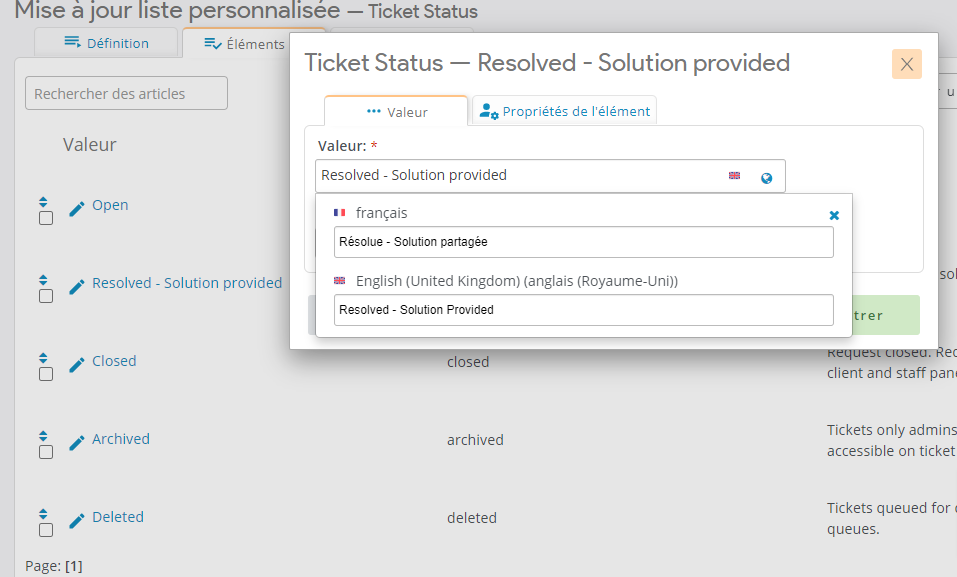
When I go to the agent dashboard and check the ticket status change feature it still displays the EN version ...
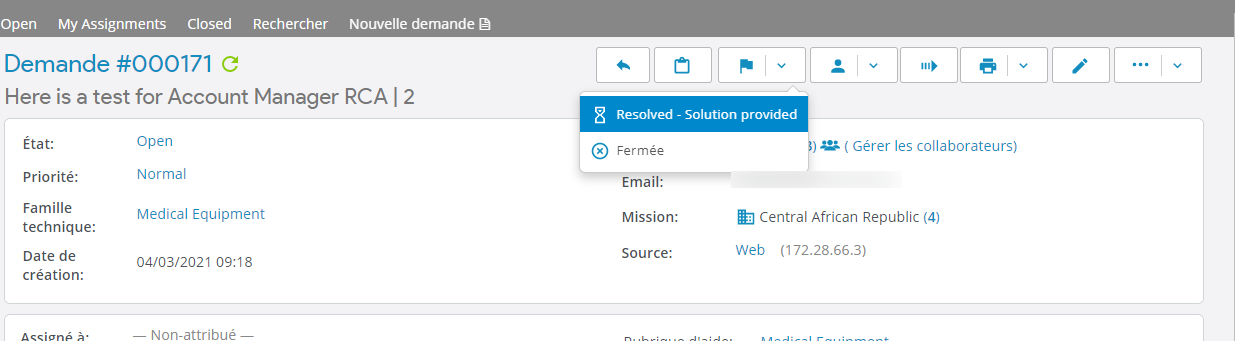
Am I missing something? Help?
My theme info is the following:
osTicket v1.14.3 // osTicket-1.14.3-Awesome-102a
PHP 7.4.12 // MySQL 5.7.30 // Apache/2.4.38 (Debian) web server

Hi @JulienVDC,
That is an upstream issue, actually.
In other words, it is an issue with osTicket itself.
When they implemented customizable Ticket "queues" around v.11 they broke a bunch of stuff to do with translations, and I don't think they've managed to sort out how they are going to fix those things yet.
If you want to see for yourself, open my vanilla osTicket 1.14.3 demo Ticket Status page:
https://osticketawesome.com/o/1.14.3/scp/lists.php?id=1
Add a French translation for one of the custom statuses (e.g. To Be Invoiced).
Now go to the Profile > Preferences page:
https://osticketawesome.com/o/1.14.3/scp/profile.php#preferences
Set the Preferred Language to French.
Now go to the Open queue:
https://osticketawesome.com/o/1.14.3/scp/tickets.php?queue=1
Note that the translation is still missing from the Ticket Status drop-down menu.
In fact, this issue continues to exist in v1.15.2.
If you want, you can report this issue on GitHub:
https://github.com/osTicket/osTicket/issues
I would do so myself, but I already have a related issue report ("Translations Missing") from October of 2019 that is still open:
https://github.com/osTicket/osTicket/issues/5098
I wish I could do more, but this is far beyond my particular skill set. And so, we wait.
Hey @stevland, appreciate the reply.
I might create a new issue then on Github to "relaunch" the conversation around it.
I've also shared this issue on their forum here: https://forum.osticket.com/d/99188-in-site-translations-not-being-applied/2
Hey @stevland, I was wondering, do you see a temporary workaround to still manage to get these translated?