
Have you checked these first?
Help us help you: include your environment details. We've made this easy for you. Use the Copy System Info button in Admin Panel › osAwesome › Diagnostics, then paste below.

Note: Never paste the contents of your ost-config.php file here; it holds your database credentials.
Two quick checks before posting: try clearing your browser cache, and press SHIFT+O on any Staff Panel page to enter Safe Mode (a stock osTicket with no enhancements). If the problem still shows in Safe Mode, it's in osTicket itself, not osTicket Awesome. But let us know about the issue either way.
Help us help you: include your environment details. We've made this easy for you. Use the Copy System Info button in Admin Panel › osAwesome › Diagnostics, then paste below.
This forum is public. Never post order numbers, full license keys, email addresses, or payment details.
This is the place for general questions about how billing and licensing work — renewals, activation, staging slots, plan differences, and what happens when a license lapses.
For anything tied to your specific account, refund, or payment, contact us directly instead.

Hi there,
How would I be able to edit the text of these two boxes?
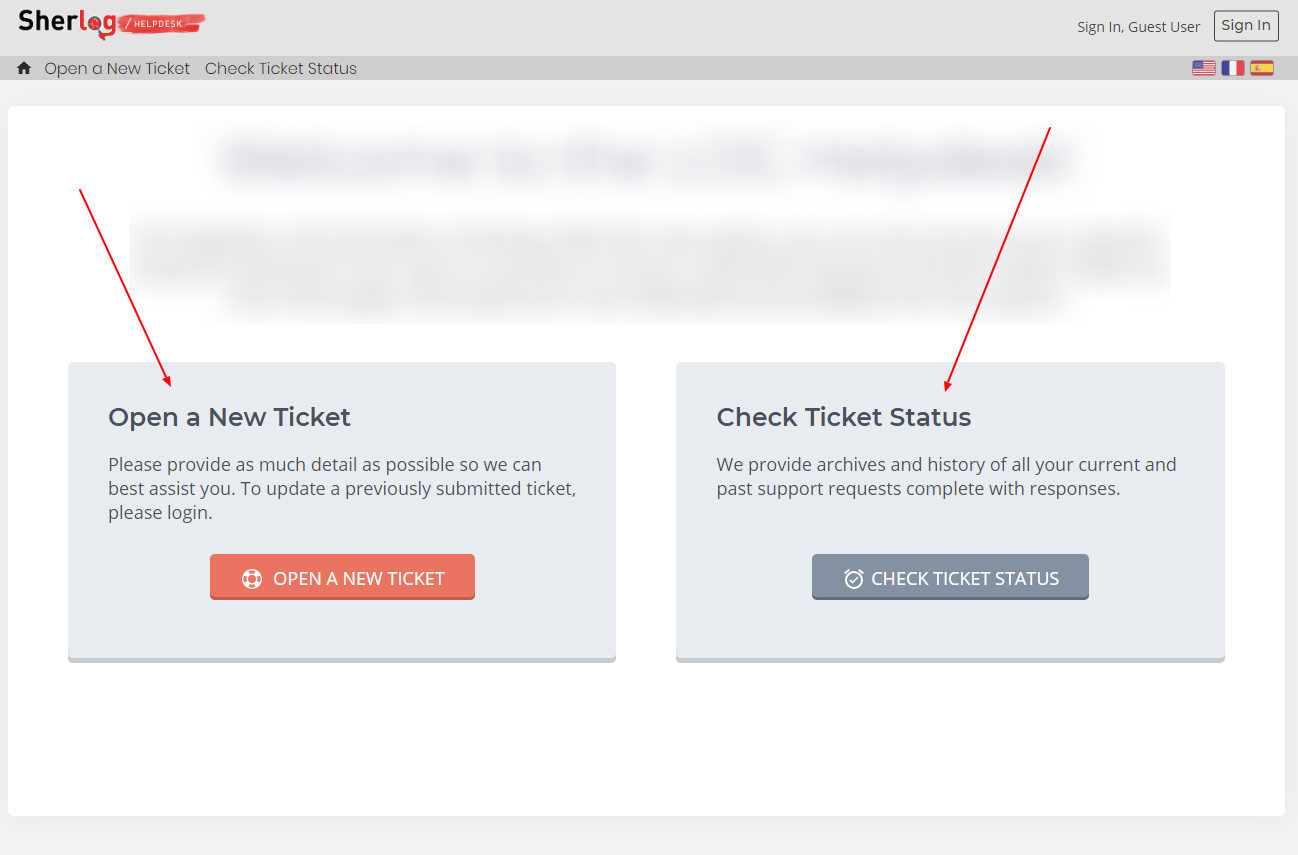
Is it possible to edit it in the admin via a form?
Cheers,
Julien

These are not configurable fields in the Theme Options, no.
To change this text you'll need to edit /index.php (it's right in the root directory of your installation).
But there are two things you should keep in mind:
1) If/ when you install an upgrade in the future you will need to re-apply your edits.
2) If you use more than one language, by editing these the text you will break the translations. That means that, no matter what language your visitor is using, any text that you have edited will display your English text.
If you do use more than one language, let me know and I will provide more information (it isn't an easy explanation, so I will spare myself the effort unless it will help you). 😉
haha thanks @stevland!
1/ Gottcha. I guess this would be the same scenario for any edits we might be making to your default theme, correct?
2/ Unfortunately we plan use to 2 other languages ... (French & Spanish)
Thanks for your time!
Julien
Hi @JulienVDC,
Because you are using more than one language, changing the text is more complicated.
In this case, the text you want to modify is in /index.php.
For example, find this line...
<?php echo __('Open a New Ticket');?>
...and change the text inside the quotes as you desire.
Then you'll want to take a look at the /include/i18n folder.
For French you'll want to edit /include/i18n/fr/LC_MESSAGES/messages.mo.php.
Find the line...
'Open a New Ticket' => 'Nouveau ticket',
...and edit both phrases within the quotes. Keep in mind that the first phrase has to match the edit you made in /index.php exactly for the translation to work!
There are three Spanish language packs (es_AR, es_ES and es_MX), so obviously you'll need to make the same edits in the correct file for your purposes.
If anyone else is reading this and wondering which language packs to edit, here is the list:
Arabic — Egypt
(مصر)
ar_SA
Arabic — Saudi Arabia
(المملكة العربية السعودية)
ar_SA
Azerbaijani
(azərbaycanca)
az_AZ
Bulgarian
(български)
bg_BG
Catalan
(Català)
ca_ES
Czech
(čeština)
cs_CZ
Danish
(dansk)
da_DK
German
(Deutsch)
de_DE
Greek
(Ελληνικά)
el_GR
Spanish — Spain
(español)
es_ES
Spanish — Mexico
(Méjico)
es_MX
Spanish — Argentina
(español argentino)
es_AR
Estonian
(eesti)
et_EE;
Persian
(Farsi)
fa_IR
Finnish
(suomi)
fi_FI
French
(français)
fr_FR
Hebrew
(עברית)
he_IL
Croatian
(hrvatski)
hr_HR
Hungarian
(magyar)
hu_HU
Indonesian
(Bahasa Indonesia)
id_ID
Italian
(italiano)
it_IT
Japanese
(日本語)
ja_JP
Korean
(한국어)
ko_KR
Lithuanian
(lietuvių)
lt_LT
Macedonian
(македонски)
mk_MK
Mongolian
(монгол)
mn_MN
Malay
(Bahasa Melayu)
ms_MY
Dutch
(Nederlands)
nl_NL
Norwegian
(norsk)
no_NO
Persian
(فارسی)
fa_IR
Polish
(polski)
pl_PL
Portuguese
(Português)
pt_PT
Portuguese — Brazil
(Português)
pt_BR;
Slovak
(slovenčina)
sk_SK
Slovenian
(slovenščina)
sl_SI
Serbian (Serbia)
(српски (Србија))
sr_CS
Swedish
(svenska)
sv_SE
Romanian
(română)
ro_RO
Russian
(русский язык)
ru_RU
Vietnamese
(Tiếng Việt)
vi_VN
Thai
(ไทย)
th_TH
Turkish
(Türkçe)
tr_TR
Ukrainian
(українська)
uk_UA
Chinese — China
(中文 (中国)
zh_CN
Chinese — Taiwan
(中文(台灣)
zh_TW
Amazing, thanks Stevland!
Hey @stevland these languages are packed as .phar files. Is it the case for you too? How can I unpack them?
Hi @julienvdc,
All the language packs that ship with osTicket Awesome are already unpacked for your convenience.
If you are using a language pack this isn't included with osTicket Awesome, then yes you'll need to unpack the phar.
- Download the phar to your computer
- upload it to this site to convert it to a zip
- download the zip to your computer
- unpack it
- upload it to your server
- remove the phar from your server
- edit the language files as desired