

I've tried everything here but it didn't work out, still with the nonstandard colors.
Já tentei de tudo aqui mas não deu certo, continua com as cores fora do padrão.

Sorry for the late reply.
Please fill out this form (at least sections 1 and 2) and I will take a look.
Form has already been filled!
Hey Charles it looks like you renamed the priorities.
Did you not realize that you broke the priority colors when you modified the ticket_priority table in your database?
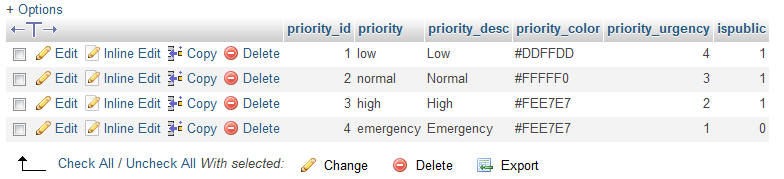
For example, I see that Emergency is now Emergência.
I suppose it is probably okay to rename priority_desc, as long as you keep priority the same.
osTicket Awesome requires the original names, for example...
class="osta_priority osta_priority_emergency"
is now...
class="osta_priority osta_priority_emergncia"
...in your installatio
This is breaking osTicket Awesome's CSS code.
So you'll probably want to at least change the priority_desc entries back to their default settings.
I might not completely understand everything you've been asking due to the language barrier. But if you want to modify how the priority colors work it would require custom code / paid support.
Good morning,
Could you fix this error?
And what about the colors, which solution appear in the standard colors?