

Hi @nelsonpark,
A blank blue screen does not sound like a familiar symptom... I can't recall anyone describing that type of issue before.
What I can tell you is that many, many customers have installed osTicket Awesome successfully on IIS servers, and on intranets before.
In terms of trying to help you—without access to your installation—my hands are unfortunately tied. But here are some suggestions:
- Clear your browser cache
- Definitely look at your log files to see if there is anything relevant being logged at the time you try to visit /helpdeskawsome/
- Try starting over and following the instructions again very carefully
- I don't know why you mention "restore to OSTICKET 1.12.2 native theme" because you can have both the native osTicket and osTicket Awesome installed concurrently, with both using the same database e.g. /helpdesk/ and /helpdeskawsome/
Let me know how you make out!

Yes, currently /helpdeskawsome is in the trial environment and /helpdesk is in production.
Tried everything: clear cache + chrome, edge and explorer browser but same blank blue screen.
Logs: what logs are you reffering to check ? PHP logs. If yes, please find below.
<hr />
[26-Aug-2019 01:06:23 UTC] PHP Warning: require_once(C:\inetpub\wwwroot/helpdeskawsome//osta/php/functions.php): failed to open stream: No such file or directory in C:\inetpub\helpdeskawsome\include\staff\login.tpl.php on line 5<br />
[26-Aug-2019 01:06:23 UTC] PHP Fatal error: require_once(): Failed opening required 'C:\inetpub\wwwroot/helpdeskawsome//osta/php/functions.php' (include_path='./;C:/inetpub/helpdeskawsome/include/;C:/inetpub/helpdeskawsome/include/pear/') in C:\inetpub\helpdeskawsome\include\staff\login.tpl.php on line 5
-----------------------------------------------
Oh, okay now this sounds familiar.
Please make sure that when you extract the osTicket Awesome zip (osTicket-1.12.2-Awesome-101.zip) you do not receive any errors and the resulting files look like this:
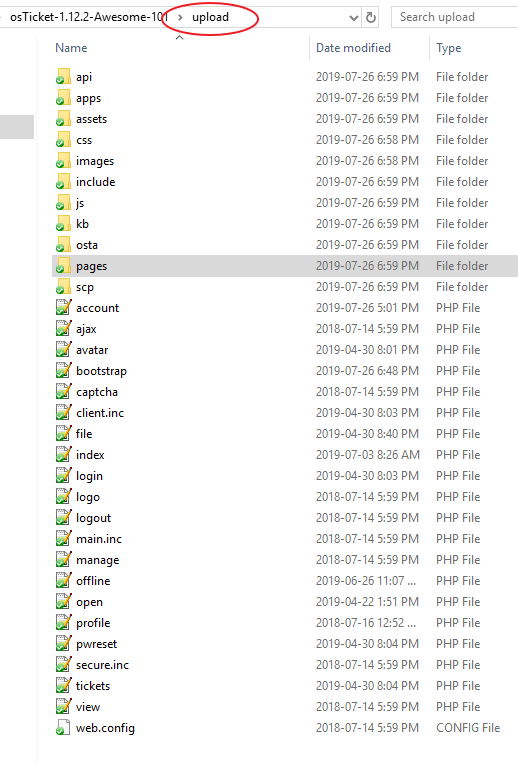
Yes it was ok. However, i have re-extract, compare the structure and paste it helpdeskawsome/, restart the IIS and its same. "Blank blue screen"
- Please post a screenshot of the helpdeskawesome/ directory listing.
- Visit your installation using Chrome. Right-click on the blue page and select view page source. Copy/paste the code here.
- Also in Chrome, open Dev Tools (Ctrl + Shift + J) and copy/paste any messages here.