
Have you checked these first?
Help us help you: include your environment details. We've made this easy for you. Use the Copy System Info button in Admin Panel › osAwesome › Diagnostics, then paste below.

Note: Never paste the contents of your ost-config.php file here; it holds your database credentials.
Two quick checks before posting: try clearing your browser cache, and press SHIFT+O on any Staff Panel page to enter Safe Mode (a stock osTicket with no enhancements). If the problem still shows in Safe Mode, it's in osTicket itself, not osTicket Awesome. But let us know about the issue either way.
Help us help you: include your environment details. We've made this easy for you. Use the Copy System Info button in Admin Panel › osAwesome › Diagnostics, then paste below.
This forum is public. Never post order numbers, full license keys, email addresses, or payment details.
This is the place for general questions about how billing and licensing work — renewals, activation, staging slots, plan differences, and what happens when a license lapses.
For anything tied to your specific account, refund, or payment, contact us directly instead.

Hello,
I need some help with a blue screen after the theme installation.
Osticket ver: 1.12.2 running on IIS
Theme updated as per instruction and after installation when trying to access http://XXXX/helpdeskawsome/scp/login.php, it only shows the blank blue screen.
Done: complete new installation of OSticket + database, upgrade from native OSticket theme, restart server, services. etc etc. But no solution.
Note: restore to OSTICKET 1.12.2 native theme version and it WORKS.

Please send the URL of your helpdesk to info@osticketawesome.com and I will take a look.
Nop.
Sorry unable to send the link as it's locally hosted and it's Dept school to forward the external traffic to internet site we need to go through many formalities. However, is there any way to upload the screenshot.
Thanks
Or you can send us the instruction if you need to run any tools to obtain logs etc.
Hi @nelsonpark,
A blank blue screen does not sound like a familiar symptom... I can't recall anyone describing that type of issue before.
What I can tell you is that many, many customers have installed osTicket Awesome successfully on IIS servers, and on intranets before.
In terms of trying to help you—without access to your installation—my hands are unfortunately tied. But here are some suggestions:
- Clear your browser cache
- Definitely look at your log files to see if there is anything relevant being logged at the time you try to visit /helpdeskawsome/
- Try starting over and following the instructions again very carefully
- I don't know why you mention "restore to OSTICKET 1.12.2 native theme" because you can have both the native osTicket and osTicket Awesome installed concurrently, with both using the same database e.g. /helpdesk/ and /helpdeskawsome/
Let me know how you make out!
Yes, currently /helpdeskawsome is in the trial environment and /helpdesk is in production.
Tried everything: clear cache + chrome, edge and explorer browser but same blank blue screen.
Logs: what logs are you reffering to check ? PHP logs. If yes, please find below.
<hr />
[26-Aug-2019 01:06:23 UTC] PHP Warning: require_once(C:\inetpub\wwwroot/helpdeskawsome//osta/php/functions.php): failed to open stream: No such file or directory in C:\inetpub\helpdeskawsome\include\staff\login.tpl.php on line 5<br />
[26-Aug-2019 01:06:23 UTC] PHP Fatal error: require_once(): Failed opening required 'C:\inetpub\wwwroot/helpdeskawsome//osta/php/functions.php' (include_path='./;C:/inetpub/helpdeskawsome/include/;C:/inetpub/helpdeskawsome/include/pear/') in C:\inetpub\helpdeskawsome\include\staff\login.tpl.php on line 5
-----------------------------------------------
Oh, okay now this sounds familiar.
Please make sure that when you extract the osTicket Awesome zip (osTicket-1.12.2-Awesome-101.zip) you do not receive any errors and the resulting files look like this:
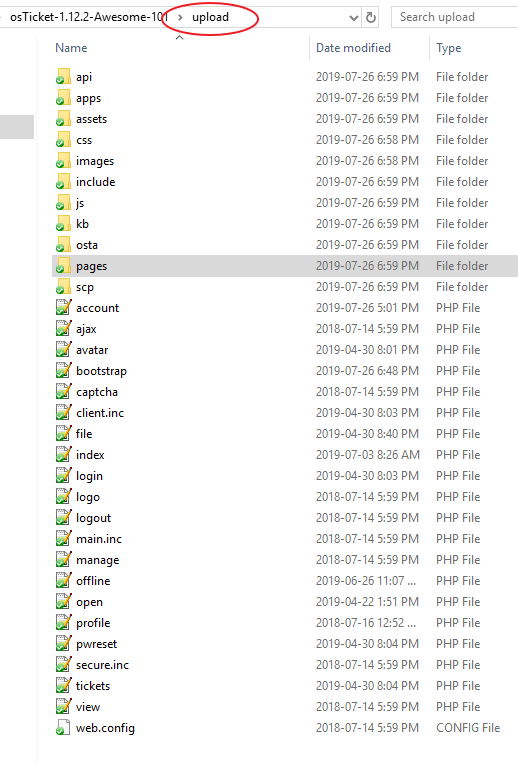
Yes it was ok. However, i have re-extract, compare the structure and paste it helpdeskawsome/, restart the IIS and its same. "Blank blue screen"
- Please post a screenshot of the helpdeskawesome/ directory listing.
- Visit your installation using Chrome. Right-click on the blue page and select view page source. Copy/paste the code here.
- Also in Chrome, open Dev Tools (Ctrl + Shift + J) and copy/paste any messages here.
Dev Tools -
GET https://cdn.jsdelivr.net/jquery.sidr/2.2.1/jquery.sidr.min.js net::ERR_CERT_AUTHORITY_INVALID
Page Source -
<!DOCTYPE html><br />
<br />
<html xmlns="http://www.w3.org/1999/xhtml" xml:lang="en" lang="en"><br />
<br />
<head><br />
<br />
<meta http-equiv="content-type" content="text/html; charset=utf-8" /><br />
<br />
<meta http-equiv="refresh" content="7200" /><br />
<br />
<title>osTicket :: Agent Login</title><br />
<br />
<link rel="stylesheet" href="css/login.css" type="text/css" /><br />
<br />
<!--osta--><br />
<br />
<meta name="robots" content="noindex" /><br />
<br />
<meta http-equiv="cache-control" content="no-cache" /><br />
<br />
<meta http-equiv="pragma" content="no-cache" /><br />
<br />
<meta name="viewport" content="width=device-width, initial-scale=1"><br />
<br />
<script type="text/javascript" src="/helpdeskawsome/js/jquery-3.4.0.min.js?a5d898b"></script><br />
<br />
<script type="text/javascript"><br />
<br />
$(document).ready(function() {<br />
<br />
$("input:not(.dp):visible:enabled:first").focus();<br />
<br />
});<br />
<br />
</script><br />
<br />
<!--osta--><br />
<br />
<meta http-equiv="resources" content="o1.12.2.a5d898b-a1.12.2-101-p7.1.7-m5.7.19-microsoft-iis/1"><br />
<br />
<meta name="viewport" content="width=device-width, initial-scale=1.0, maximum-scale=1.0, user-scalable=no"><br />
<br />
<script src="//cdn.jsdelivr.net/jquery.sidr/2.2.1/jquery.sidr.min.js"></script><br />
<br />
<link href="https://fonts.googleapis.com/css?family=Product+Sans|Montserrat:400|Open+Sans:300,400,600" rel="stylesheet" type="text/css"><br />
<br />
<br />
<br />
<link type="text/css" rel="stylesheet" href="/helpdeskawsome/osta/css/staff-desktop.css"/><br />
<br />
<link type="text/css" rel="stylesheet" href="/helpdeskawsome/osta/css/staff-mobile.css"/><br />
<br />
<link type="text/css" rel="stylesheet" href="/helpdeskawsome/osta/css/svg.css"/><br />
<br />
<link rel="stylesheet" href="/helpdeskawsome/osta/css/sidr.css"><br />
<br />
<br />
<br />
<style type="text/css"><br />
<br />
#header,<br />
<br />
#loginBody #brickwall,<br />
<br />
#background-solid-image .image {<br />
<br />
background-image: url("/helpdeskawsome/osta/img/backdrops/01");<br />
<br />
}<br />
<br />
#header {<br />
<br />
background-image: initial !important;<br />
<br />
}<br />
<br />
#loginBody #brickwall {<br />
<br />
background-image: initial;<br />
<br />
}<br />
<br />
<br />
<br />
</style><br />
<br />
<br />
<link type="text/css" rel="stylesheet" href="/helpdeskawsome/osta/opt/logo/logo-options-default.css"><br />
<br />
<link rel="shortcut icon" href="/helpdeskawsome/osta/css/themes/ice/favicon.ico"><br />
<br />
<link rel="shortcut icon" href="/helpdeskawsome/osta/css/themes/ice/favicon.png"><br />
<br />
<br />
<br />
<br />
<link type="text/css" rel="stylesheet" id="jssDefault" href="/helpdeskawsome/osta/css/themes/ice.css"> <link rel="stylesheet" href="/helpdeskawsome/osta/css/hamburger.css"><br />
<br />
<script type="text/javascript" src="../osta/js/osta-staff.js"></script><br />
<br />
<script type="text/javascript" src="../osta/js/jQuery.style.switcher.js"></script><br />
<br />
<link type="text/css" rel="stylesheet" href="/helpdeskawsome/osta/user-styles.css"/><br />
<br />
<script type="text/javascript" src="../osta/user-scripts.js"></script><br />
<br />
<br />
<br />
<br />
</head><br />
<br />
<body id="loginBody">
Any Update ?
Hmmm your view page source code looks normal until it end abruptly at <body id=”loginBody”>. Are you sure that's where the page ends?
I'm not sure why you would receive the jquery.sidr.min.js net::ERR_CERT_AUTHORITY_INVALID error but it is most likely inconsequential.
I'm still waiting for a screenshot of your helpdeskawesome/ directory listing.
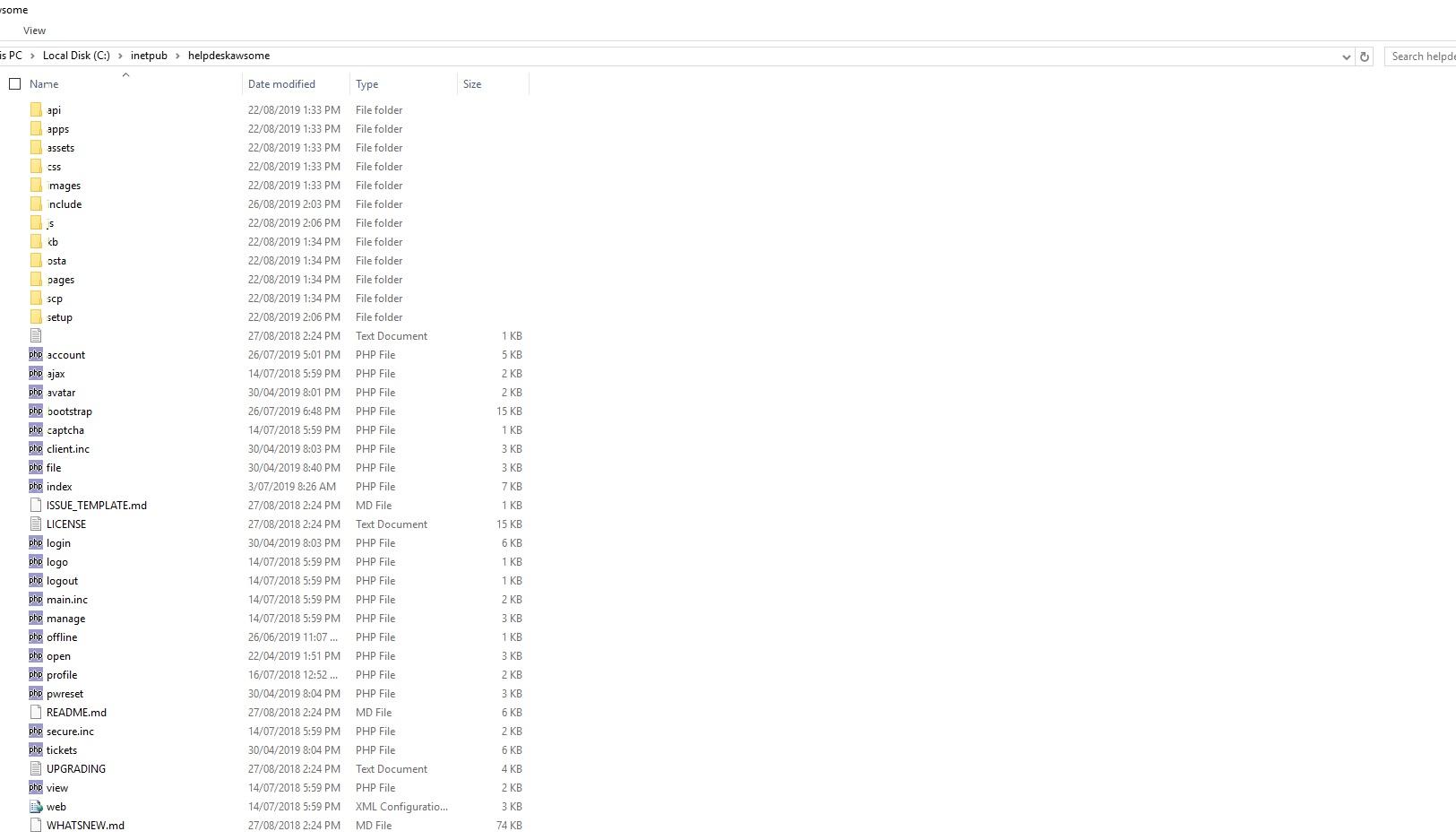
Please confirm that your source code (as you posted above) ends abruptly at <body id=”loginBody”>.
And let's try a clean install of osTicket Awesome:
- Please upload the /upload folder from the extracted osTicket Awesome folder to your server.
- Copy ost-config.php from /helpdesk/include/ to /upload/include/
- Visit http://XXXX/upload/scp/login.php and test, let me know if it works.
same result----
page source:
<!DOCTYPE html><br />
<br />
<html xmlns="http://www.w3.org/1999/xhtml" xml:lang="en" lang="en"><br />
<br />
<head><br />
<br />
<meta http-equiv="content-type" content="text/html; charset=utf-8" /><br />
<br />
<meta http-equiv="refresh" content="7200" /><br />
<br />
<title>osTicket :: Agent Login</title><br />
<br />
<link rel="stylesheet" href="css/login.css" type="text/css" /><br />
<br />
<!--osta--><br />
<br />
<meta name="robots" content="noindex" /><br />
<br />
<meta http-equiv="cache-control" content="no-cache" /><br />
<br />
<meta http-equiv="pragma" content="no-cache" /><br />
<br />
<meta name="viewport" content="width=device-width, initial-scale=1"><br />
<br />
<script type="text/javascript" src="/upload/js/jquery-3.4.0.min.js?a5d898b"></script><br />
<br />
<script type="text/javascript"><br />
<br />
$(document).ready(function() {<br />
<br />
$("input:not(.dp):visible:enabled:first").focus();<br />
<br />
});<br />
<br />
</script><br />
<br />
<!--osta--><br />
<br />
<meta http-equiv="resources" content="o1.12.2.a5d898b-a1.12.2-101-p7.1.7-m5.7.19-microsoft-iis/1"><br />
<br />
<meta name="viewport" content="width=device-width, initial-scale=1.0, maximum-scale=1.0, user-scalable=no"><br />
<br />
<script src="//cdn.jsdelivr.net/jquery.sidr/2.2.1/jquery.sidr.min.js"></script><br />
<br />
<link href="https://fonts.googleapis.com/css?family=Product+Sans|Montserrat:400|Open+Sans:300,400,600" rel="stylesheet" type="text/css"><br />
<br />
<br />
<br />
<link type="text/css" rel="stylesheet" href="/upload/osta/css/staff-desktop.css"/><br />
<br />
<link type="text/css" rel="stylesheet" href="/upload/osta/css/staff-mobile.css"/><br />
<br />
<link type="text/css" rel="stylesheet" href="/upload/osta/css/svg.css"/><br />
<br />
<link rel="stylesheet" href="/upload/osta/css/sidr.css"><br />
<br />
<br />
<br />
<style type="text/css"><br />
<br />
#header,<br />
<br />
#loginBody #brickwall,<br />
<br />
#background-solid-image .image {<br />
<br />
background-image: url("/upload/osta/img/backdrops/01");<br />
<br />
}<br />
<br />
#header {<br />
<br />
background-image: initial !important;<br />
<br />
}<br />
<br />
#loginBody #brickwall {<br />
<br />
background-image: initial;<br />
<br />
}<br />
<br />
<br />
</style><br />
<link type="text/css" rel="stylesheet" href="/upload/osta/opt/logo/logo-options-default.css"><br />
<br />
<link rel="shortcut icon" href="/upload/osta/css/themes/ice/favicon.ico"><br />
<br />
<link rel="shortcut icon" href="/upload/osta/css/themes/ice/favicon.png"><br />
<br />
<br />
<link type="text/css" rel="stylesheet" id="jssDefault" href="/upload/osta/css/themes/ice.css"> <link rel="stylesheet" href="/upload/osta/css/hamburger.css"><br />
<br />
<script type="text/javascript" src="../osta/js/osta-staff.js"></script><br />
<br />
<script type="text/javascript" src="../osta/js/jQuery.style.switcher.js"></script><br />
<br />
<link type="text/css" rel="stylesheet" href="/upload/osta/user-styles.css"/><br />
<br />
<script type="text/javascript" src="../osta/user-scripts.js"></script><br />
-----------------------
Thanks
Hi,
Any update?
I am still waiting for an answer from you.
As per my last message, let’s try a clean install of osTicket Awesome:
- Please upload the /upload folder from the extracted osTicket Awesome folder to your server.
- Copy ost-config.php from /helpdesk/include/ to /upload/include/
- Visit http://XXXX/upload/scp/login.php and test, let me know if it works.
Already done and posted in reply.
Hi nelsonpark,
I asked you two unique things. When you posted "same result" I assumed you were referring to the first item and you had overlooked or disregarded the second item.
If I am now understanding you correctly, you are saying that you completed the second item and "same result" is a response to both items.
Interestingly, it isn't the same result. The first time you posted the source code it was cut off at the opening <body> tag. I was trying to ensure that you posted what was there in its entirety. Your new source code post cuts off even earlier, and yet you say it is the same result. It isn't filling me with confidence that we are on the same page.
For the first time in 2 years, and after hundreds of successful installations, I am at a complete loss. Given that I cannot connect to your server through the standard methods (SSH, FTP) the only other thing that I can think of is to schedule a TeamViewer session. If you would like to proceed let me know what time zone you are in (I'm in Pacific GMT-7) and give me a rough idea of when you are available this week and we will take it from there.
Hi,
When i said the same result, i was referring to " Same blue screen" not the code result.
Yes, teamviewer would be great.
We are based in Victoria Australia ( UTC +10) Sydney Melbourne. Current time is: Tuesday 3rd sep 9:35am
On what email address do you want me to forward the TeamViewer details?
Thanks
When i said the same result, i was referring to ” Same blue screen” not the code result
Don't be afraid to be verbose! 🙂
That is a tough time zone to match up with! Would 9am tomorrow (your time) work for you?
info@osticketawesome.com