
Have you checked these first?
Help us help you: include your environment details. We've made this easy for you. Use the Copy System Info button in Admin Panel › osAwesome › Diagnostics, then paste below.

Note: Never paste the contents of your ost-config.php file here; it holds your database credentials.
Two quick checks before posting: try clearing your browser cache, and press SHIFT+O on any Staff Panel page to enter Safe Mode (a stock osTicket with no enhancements). If the problem still shows in Safe Mode, it's in osTicket itself, not osTicket Awesome. But let us know about the issue either way.
Help us help you: include your environment details. We've made this easy for you. Use the Copy System Info button in Admin Panel › osAwesome › Diagnostics, then paste below.
This forum is public. Never post order numbers, full license keys, email addresses, or payment details.
This is the place for general questions about how billing and licensing work — renewals, activation, staging slots, plan differences, and what happens when a license lapses.
For anything tied to your specific account, refund, or payment, contact us directly instead.

Hi,
when i create any custom List, add it to a form and allow multiselect, it works well in client panel. Users can type ahead in the box or click on an element from the list and will see all selected items (as small boxes) in the select-box. Users can add items and use the small cross to remove items. Perfect. Now, the exact same list / form edited form the staff panel displays nothing. It does not show the items you added. So you can't see what you just added and can't remove items - but they're there. You just can't see them.
Example from your staff demo:
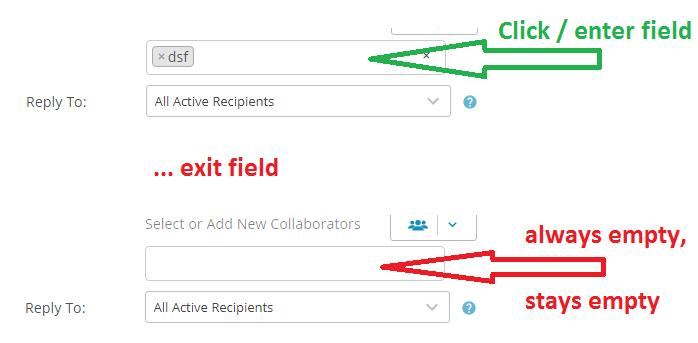
Since we want to start using a lot of lists it would be awesome if they display correctly.

Thank you for the detailed report. I will look into this.

experienced the same
Hi guys,
Please open /osta/css/staff-desktop.css and delete the following entry:
.select2-container--default .select2-selection--multiple .select2-selection__rendered {
margin: 0;
width: 100%;
height: 30px;
}
Assuming you are using osTicket-1.12-Awesome-102 it will be lines 3085 - 3088.

Hi, thank you for you help here. It solves the problem for the collaborators completly, but only half the problem at custom lists. I made another test in the demo staff (see picture): if you add an item that doesn't fit in the box, the textfield gets larger without its size getting adjusted.
Hi it-support@lindner-esskultur.de,
This will be fixed in the next release... which will be out soon! :D