
Have you checked these first?
Help us help you: include your environment details. We've made this easy for you. Use the Copy System Info button in Admin Panel › osAwesome › Diagnostics, then paste below.

Note: Never paste the contents of your ost-config.php file here; it holds your database credentials.
Two quick checks before posting: try clearing your browser cache, and press SHIFT+O on any Staff Panel page to enter Safe Mode (a stock osTicket with no enhancements). If the problem still shows in Safe Mode, it's in osTicket itself, not osTicket Awesome. But let us know about the issue either way.
Help us help you: include your environment details. We've made this easy for you. Use the Copy System Info button in Admin Panel › osAwesome › Diagnostics, then paste below.
This forum is public. Never post order numbers, full license keys, email addresses, or payment details.
This is the place for general questions about how billing and licensing work — renewals, activation, staging slots, plan differences, and what happens when a license lapses.
For anything tied to your specific account, refund, or payment, contact us directly instead.

osTicket v1.16.1 // osTicket-1.16.1-Awesome-101
PHP 8.0.13 // MySQL 5.7.36 // Apache web server
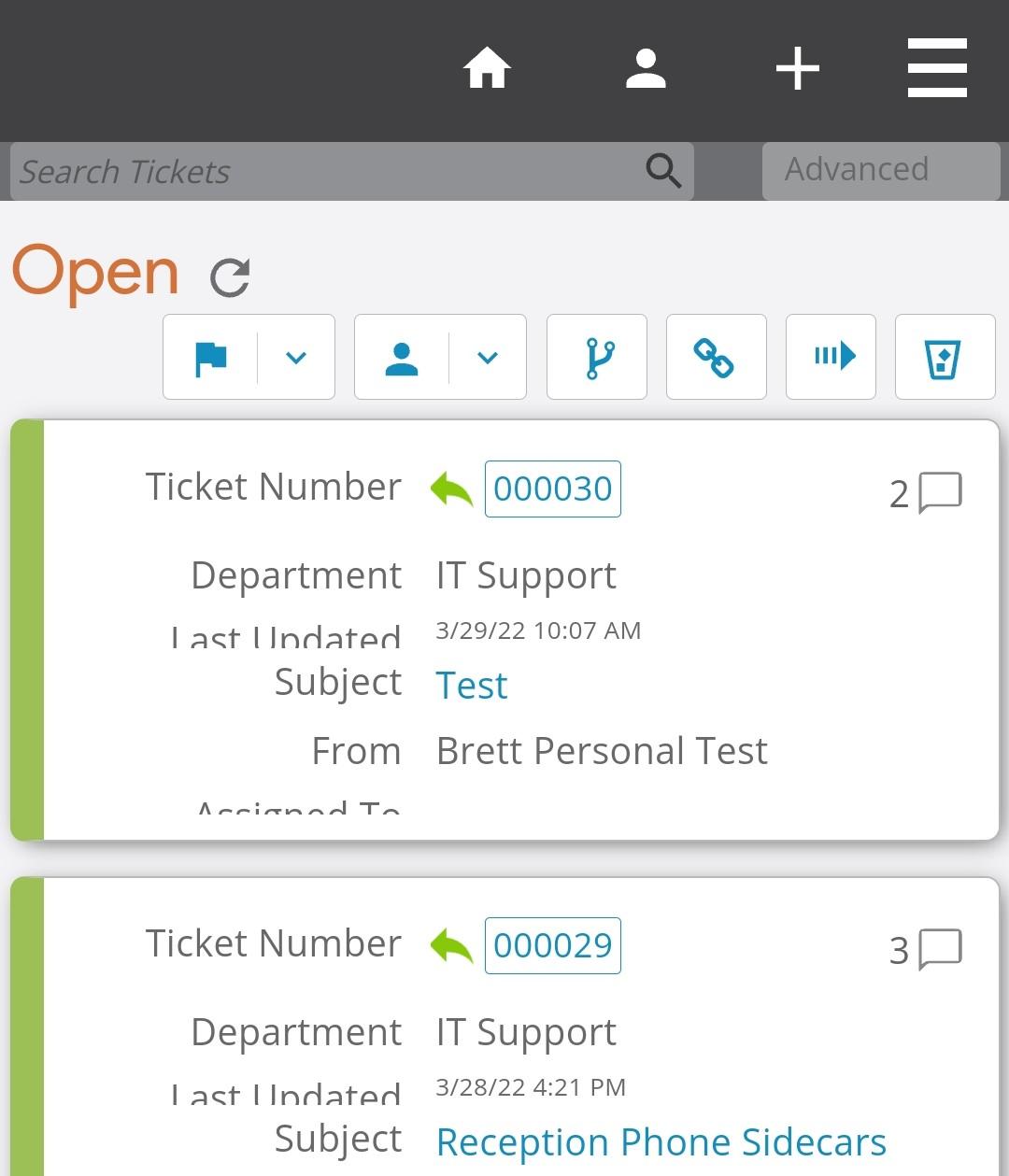
Anyone else having odd rendering issues on the staff-site mobile view of tickets? In the screenshot below, the Last Updated and Assigned to data is truncated and displays different sizing. I've turned off my custom CSS but the issue persists, so I don't think it's anything I've done. Any suggestions with where this may be or how to resolve it?

Thank you for reporting this. I will fix it in the next release.
I definitely see the issue with Last Updated on my end. You can fix this simply by adding the following code to Admin Panel > Theme > Custom CSS:
@media only screen and (max-width: 760px) {
.list td.osta_lastupdated:before {
content: "Last Updated";
top: -4px !important;
}
}
Unfortunately I do not see the issue with Assigned To on my end. I wonder if you've customized the order of columns in the desktop version of the Ticket List (which will also affect the mobile version)?
If you would like me to try to figure out what is going on I will need access to your installation to investigate.
I will mark this as resolved for now, but feel free to still post any updates or questions here.


Hello Stevland.
The field names translation in agents directory page (mobile view) is not working. Also note that the "name" field is in the wrong position.
Thanks,
Anderson
Which language pack are you using?
The "name" field will be fixed in the next release, thank you for the report.
If you want to fix it right away please add the following to Admin Panel > Theme > Custom CSS:
@media only screen and (max-width: 760px) {
.directory-page .list td:nth-of-type(2) {
padding-top: 0 !important;
}
.directory-page .directory .list td:first-child {
display: block;
}
}
Hello Stevland,
This CSS customization didn't work.
I'm using the latest version of Osticket Awesome v. 1.16.3 from a new one install.
The tests above were made from my developer platform AND your online testing platform, both in Brazilian Portuguese language.
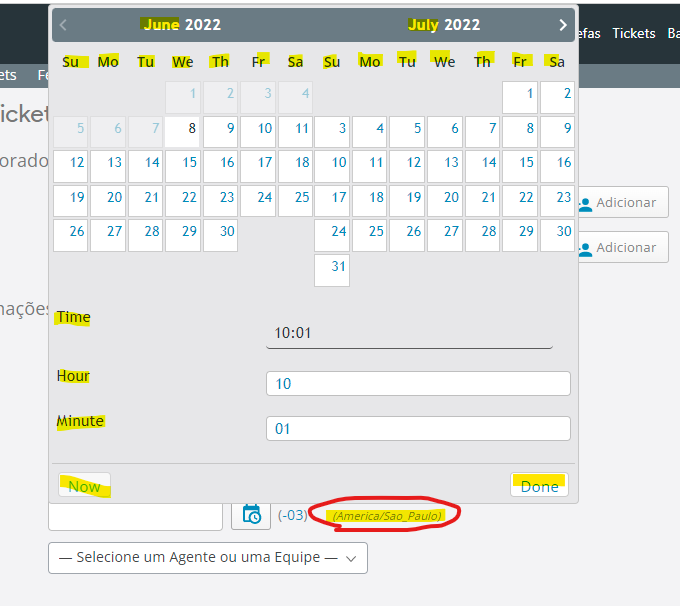
Also, when creating a new ticket, the datepicker is also not translating to Brazilian Portuguese. This error also occurs on your online testing platform. The other items are being translated normally, except in the agent directory (/scp/directory.php) where the field names are not being translated either.
Still waiting for reply.
This CSS customization didn’t work.
I suggest upgrading to the latest release.
Also, when creating a new ticket, the datepicker is also not translating to Brazilian Portuguese.
I can assure you that the datepicker is translating properly.
I'm afraid that the problem is that the Brazilian Portugese language pack is missing a lot of translations... it is only 17% complete!
https://crowdin.com/project/osticket-official
You may consider opening a Crowdin account and contributing.