
Have you checked these first?
Help us help you: include your environment details. We've made this easy for you. Use the Copy System Info button in Admin Panel › osAwesome › Diagnostics, then paste below.

Note: Never paste the contents of your ost-config.php file here; it holds your database credentials.
Two quick checks before posting: try clearing your browser cache, and press SHIFT+O on any Staff Panel page to enter Safe Mode (a stock osTicket with no enhancements). If the problem still shows in Safe Mode, it's in osTicket itself, not osTicket Awesome. But let us know about the issue either way.
Help us help you: include your environment details. We've made this easy for you. Use the Copy System Info button in Admin Panel › osAwesome › Diagnostics, then paste below.
This forum is public. Never post order numbers, full license keys, email addresses, or payment details.
This is the place for general questions about how billing and licensing work — renewals, activation, staging slots, plan differences, and what happens when a license lapses.
For anything tied to your specific account, refund, or payment, contact us directly instead.

osTicket Awesome version: 1.16.2
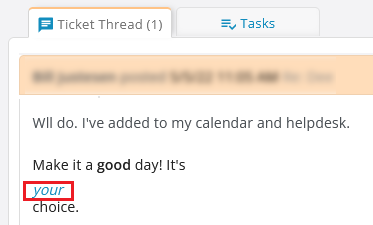
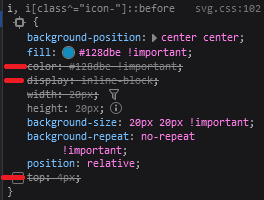
Hello. Words with italics aren't inline with the rest of the text. The i directive in svg.css has the following set:
display: inline-block;
color: #128dbe !important;
top: 4px;
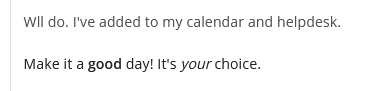
If I remove those, then the text displays properly.
Before
CSS changes
After

Hmmm.
If you're using the formatting toolbar to italicize the word, it will wrap it in <em> tags, which will work as expected.
Thus I guess you are manually adding HTML tags yourself. If that's the case, you must be an old timer like me. But perhaps you didn't know that the <i> tag was depreciated many years ago, much like the <b> tag was replaced by <strong>.
In vanilla osTicket the devs used <i> as some kind of a short-hand for icons, and in this case the properties that are getting picked up are actually meant for icons that use inline SVG images.
My fear is that, by modifying that CSS you will end up with icons appearing wonky elsewhere in osTicket Awesome. And you may not realize the connection.
If my guess is correct, and if you still really want to use <i> tags to italicize words while manually formatting your text with HTML, the real trick (rather than editing the CSS that is intended for icons) would be to target the ticket thread text specifically, like this:
.thread-body i {
display: initial !important;
width: initial !important;
color: inherit !important;
height: initial !important;
background: initial !important;
position: initial !important;
}
I hope this helps.
In digging into it more, I found that the issue only occurs when an email comes in from Gmail with the italics to create the ticket. Somehow Gmail is doing that weird formatting. If I click the ticket to edit it and then just click the Save button, the formatting becomes normal again. I don't have to change any tags or anything. So it's somehow related to Gmail.
And yeah, old timer here. I forget about the tags when I do it manually. Plus it's an extra letter, why make me type more than necessary?
Thanks for the update. I will add that fix to the next release in order to accommodate tickets from Gmail.