
Have you checked these first?
Help us help you: include your environment details. We've made this easy for you. Use the Copy System Info button in Admin Panel › osAwesome › Diagnostics, then paste below.

Note: Never paste the contents of your ost-config.php file here; it holds your database credentials.
Two quick checks before posting: try clearing your browser cache, and press SHIFT+O on any Staff Panel page to enter Safe Mode (a stock osTicket with no enhancements). If the problem still shows in Safe Mode, it's in osTicket itself, not osTicket Awesome. But let us know about the issue either way.
Help us help you: include your environment details. We've made this easy for you. Use the Copy System Info button in Admin Panel › osAwesome › Diagnostics, then paste below.
This forum is public. Never post order numbers, full license keys, email addresses, or payment details.
This is the place for general questions about how billing and licensing work — renewals, activation, staging slots, plan differences, and what happens when a license lapses.
For anything tied to your specific account, refund, or payment, contact us directly instead.

osTicket v1.12 // osTicket-1.12-Awesome-105<br />
PHP 7.0.33 // MySQL 5.7.27 // Apache web server
Please how to change due date format view in te due date column, all the others are correct, due date doesn't consider the date format setting

That is osTicket core functionality that you want to change. It has nothing to do with osTicket Awesome.
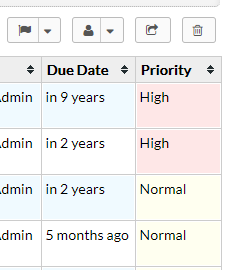
I suggest that you ask this question in the osTicket Mods and Customizations forum:
https://forum.osticket.com/t/mods-and-customizations
I opened already a ticket and they reply that it is due to the theme.
here the link:
https://forum.osticket.com/d/96243-change-date-format-in-the-view-ticket-page-due-date-column
Please THX!
I'm really confused by this. Because in osTicket and in osTicket Awesome, the Due Date column do not respect the date format setting.
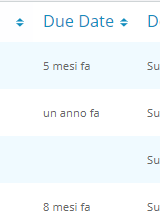
I believe you are using the Italian language pack, yes? Even so, the Due Date column should look like this:
And yet, your installation looks like this:
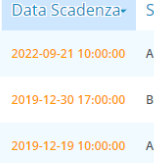
Just based on the orange color of the text alone, it seems clear that you have further modified your installation. Which is fine, that is your decision.
But to answer your original question, as you've noticed the Date Due column uses its own formatting. This is the default osTicket behavior and there is no setting to override this.
You'll have to either remove your modification or keep working on it until you are happy with the result. I am afraid that this is beyond the type of thing that I can support.