
Have you checked these first?
Help us help you: include your environment details. We've made this easy for you. Use the Copy System Info button in Admin Panel › osAwesome › Diagnostics, then paste below.

Note: Never paste the contents of your ost-config.php file here; it holds your database credentials.
Two quick checks before posting: try clearing your browser cache, and press SHIFT+O on any Staff Panel page to enter Safe Mode (a stock osTicket with no enhancements). If the problem still shows in Safe Mode, it's in osTicket itself, not osTicket Awesome. But let us know about the issue either way.
Help us help you: include your environment details. We've made this easy for you. Use the Copy System Info button in Admin Panel › osAwesome › Diagnostics, then paste below.
This forum is public. Never post order numbers, full license keys, email addresses, or payment details.
This is the place for general questions about how billing and licensing work — renewals, activation, staging slots, plan differences, and what happens when a license lapses.
For anything tied to your specific account, refund, or payment, contact us directly instead.

osTicket v1.12 // osTicket-1.12-Awesome-104<br />
PHP 5.6.40 // MySQL 5.7.26 // Apache web server
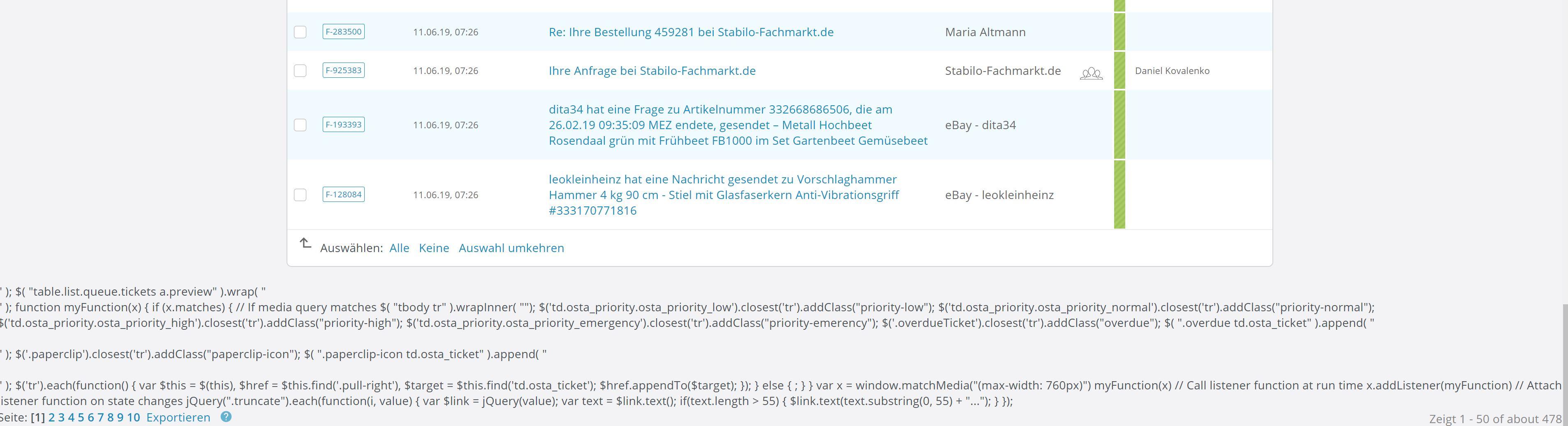
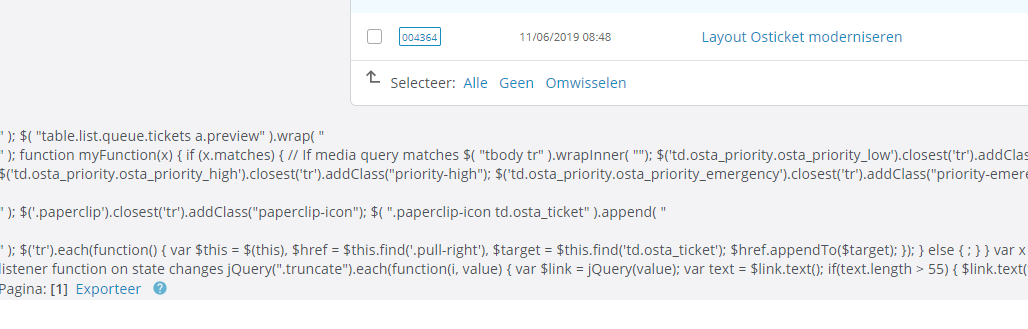
I get following error code in new version:
"" ); $( "table.list.queue.tickets a.preview" ).wrap( "<br />
" ); function myFunction(x) { if (x.matches) { // If media query matches $( "tbody tr" ).wrapInner( ""); $('td.osta_priority.osta_priority_low').closest('tr').addClass("priority-low"); $('td.osta_priority.osta_priority_normal').closest('tr').addClass("priority-normal"); $('td.osta_priority.osta_priority_high').closest('tr').addClass("priority-high"); $('td.osta_priority.osta_priority_emergency').closest('tr').addClass("priority-emerency"); $('.overdueTicket').closest('tr').addClass("overdue"); $( ".overdue td.osta_ticket" ).append( "<br />
<br />
" ); $('.paperclip').closest('tr').addClass("paperclip-icon"); $( ".paperclip-icon td.osta_ticket" ).append( "<br />
<br />
" ); $('tr').each(function() { var $this = $(this), $href = $this.find('.pull-right'), $target = $this.find('td.osta_ticket'); $href.appendTo($target); }); } else { ; } } var x = window.matchMedia("(max-width: 760px)") myFunction(x) // Call listener function at run time x.addListener(myFunction) // Attach listener function on state changes jQuery(".truncate").each(function(i, value) { var $link = jQuery(value); var text = $link.text(); if(text.length > 55) { $link.text(text.substring(0, 55) + "..."); } });"

Hey mate. Just purchased and started running osTicket Awesome myself. But curiously did you try the following:
- Clear cache (or better yet use Incognito (most browsers support this now))
- Run your osTicket with PHP v7.2
Best regards,
Hope you get it sorted.
Steve

Hi, I've got the same problem.
Installation is running on php 7.2
If you have Google Chrome do the following:
- On the page with the issues
- Click the 3 dots top right
- Hover over "More Tools"
- Click "Developer Options"
- On the tabs available click "Console"
- What error messages show up there if any?
Also do you have any PHP error logs?
Have you tried Chrome's Incognito option?

Thank you for the reports, @fachmarkt and @Aliplast.
I am trying to figure out what could be causing this on your end. Unfortunately I can't reproduce the issue on my end.
Thanks to @techcare we have ruled out PHP version as the cause.
I notice that you are both using language packs. But I don't have the same error while using Dutch in Chrome, Opera, Firefox, Edge or Safari.
Can either of you tell me if you see the error in this demo?
Any additional information is appreciated.
Hi guys,
Please right-click and download this file. Upload it to /include/staff/templates.
Let me know if it fixes the issue on your end.
Thank you!
Hi Stevland,
at your demo site theres no error. Works perfect there.
At my installation i am using the german language pack.
And... unfortunetely i cannot donwload the php file. https://osticketawesome.com/wp-content/uploads/queue-tickets.tmpl.php.txt
I get just a server error message ;-/
Yes, there are no errors in the demo installation even when using the German language pack. 😐
Please right click on the link to download.
I emailed a copy of the file to both of you to be certain.
Hi Stevland, thanks for the quick feedback.
I also cannot download the .php file and there was no attachment on your mail.
Perhaps it is blocked by our firewalls. Can you attach it as a zipped file?
FYI
The demo site looks fine ...
Hi stevland, thank you for sending the file by email.
I copied to the folder, the old file was overwritted by this new one... but, i have the same error... it doesn't help ;-/
And i also installed PHP 7.2 on my server... without any effect also.
And if this can help you: The Google Developer Console says: Uncaught SyntaxError: Invalid or unexpected token tickets.php:766 Uncaught SyntaxError: Invalid or unexpected token
Maybe this can help?
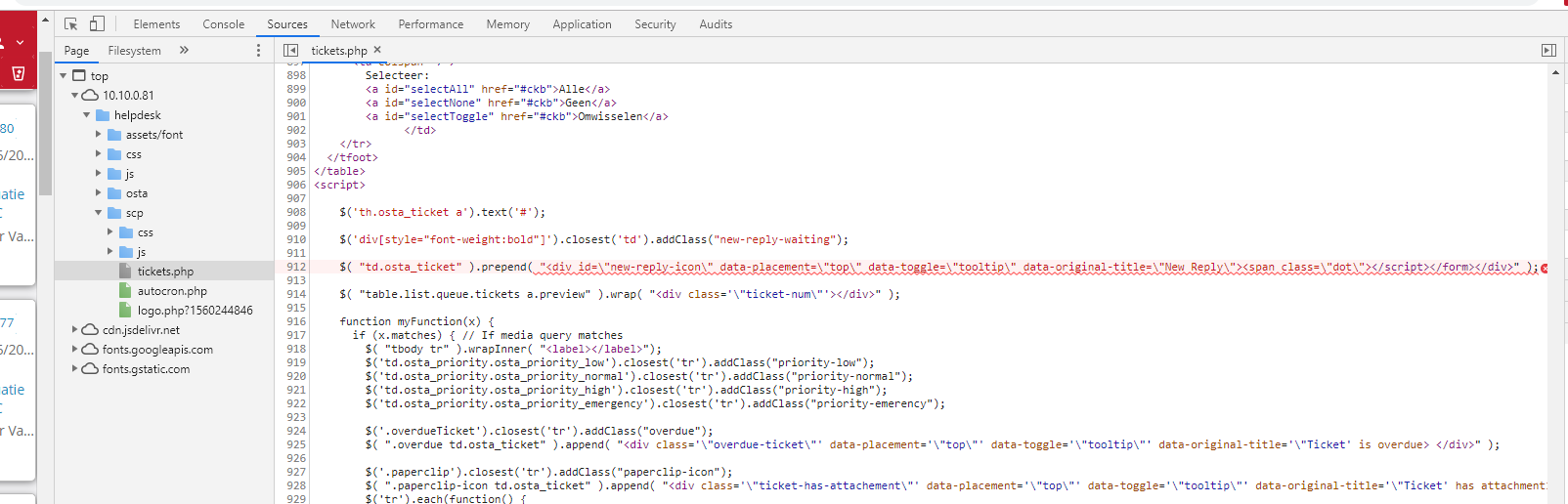
Thank you for the screenshot, @Aliplast. But unfortunately it has only made me more confused! (⊙_⊙)
I can't see anything terribly wrong with the code. I don't know why it is marked red by Chrome's Dev Tools while the rest of the jQuery code is not.
Also, there is no file named "tickets.php". Indeed, a file by that name is nowhere to be found in my own Dev Tools.
I notice your IP address is 10.10.0.81. That means that you are connected to a VPN. Is it possible to disconnect from the VPN and connect to your osTicket Awesome installation directly?
@fachmarkt are you using a VPN?
I'd like to figure out what is going on. I would really appreciate it if one or both of you could create a temporary agent account (Admin Panel > Agents > Add New Agent) for me using info@osticketawesome.com. Be sure to give the account full administrative privileges.
Are you sure @stevland ??
I have 2x tickets.php files:
One is stored in /support/scp/tickets.php
The other is stored in /support/tickets.php
* /support/ is the location of osTicket install
Hi, our installation is on an internal network so no exposure to the outworld ...
+ same remark as @techcare concerning the tickets.php files
@fachmarkt are you using a VPN?, no we are not. I also checked our ticket system at several offices in several areas. The problem is still the same...
You have received a login email...
Thank you very much in advance!
Fair enough. I shouldn't have said that there is no file named tickets.php. What I should have said is that the code in @Aliplast's screenshot is from a file named queue-tickets.tmpl.php.txt. Perhaps tickets.php parses that file.
In any event, the main point I was trying to make is that I cannot get locate the same file/code within the Sources tab of Dev Tools. Can you?
It may be a moot point. It is just another odd aspect of this situation and I was thinking out loud.
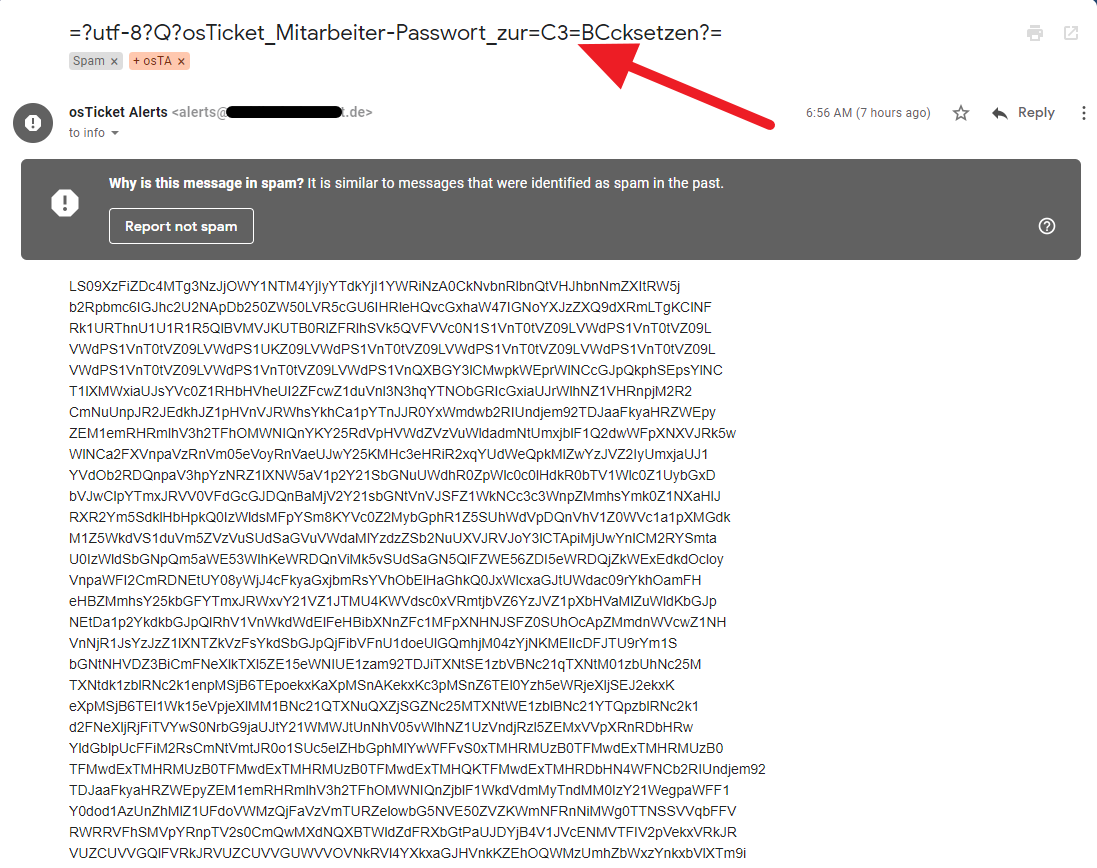
Unfortunately I cannot log into your installation. I received this really weird email from your osTicket today:
I'm at a bit of a standstill with this one, guys, but I'm still keen to figure it out.
@fachmarkt have you had a chance to figure out why your system is sending emails in the wrong format?
Hi Stevland,
no, until now not. But i will send you an email with User Login + PW later.
So you can login at our system.
Thank you in advance
OK, tx
keep me posted and let know if you need more input from me
@fachmarkt. I was able to successfully access your osTicket Awesome installation and track down the source of the issue. Thank you.
You are using the attachment_preview plugin. When the plugin is disabled, the issue is not present.
I have opened a GitHub issue with the plugin developer in the hope that he'll have an idea as to what the conflict may be.
@Aliplast, I am assuming that you are using the same plugin, yes?
@fachmarkt I left the plugin disabled in your installation. If you wish to re-enable it you can do so by going to Admin Panel > Manage > Plugins.
Thank you so much, stevland. 😉
That was easy ...
But now i think we have new issue in our system...
I cannot click the Topics we can see in black color... whats going wrong here?
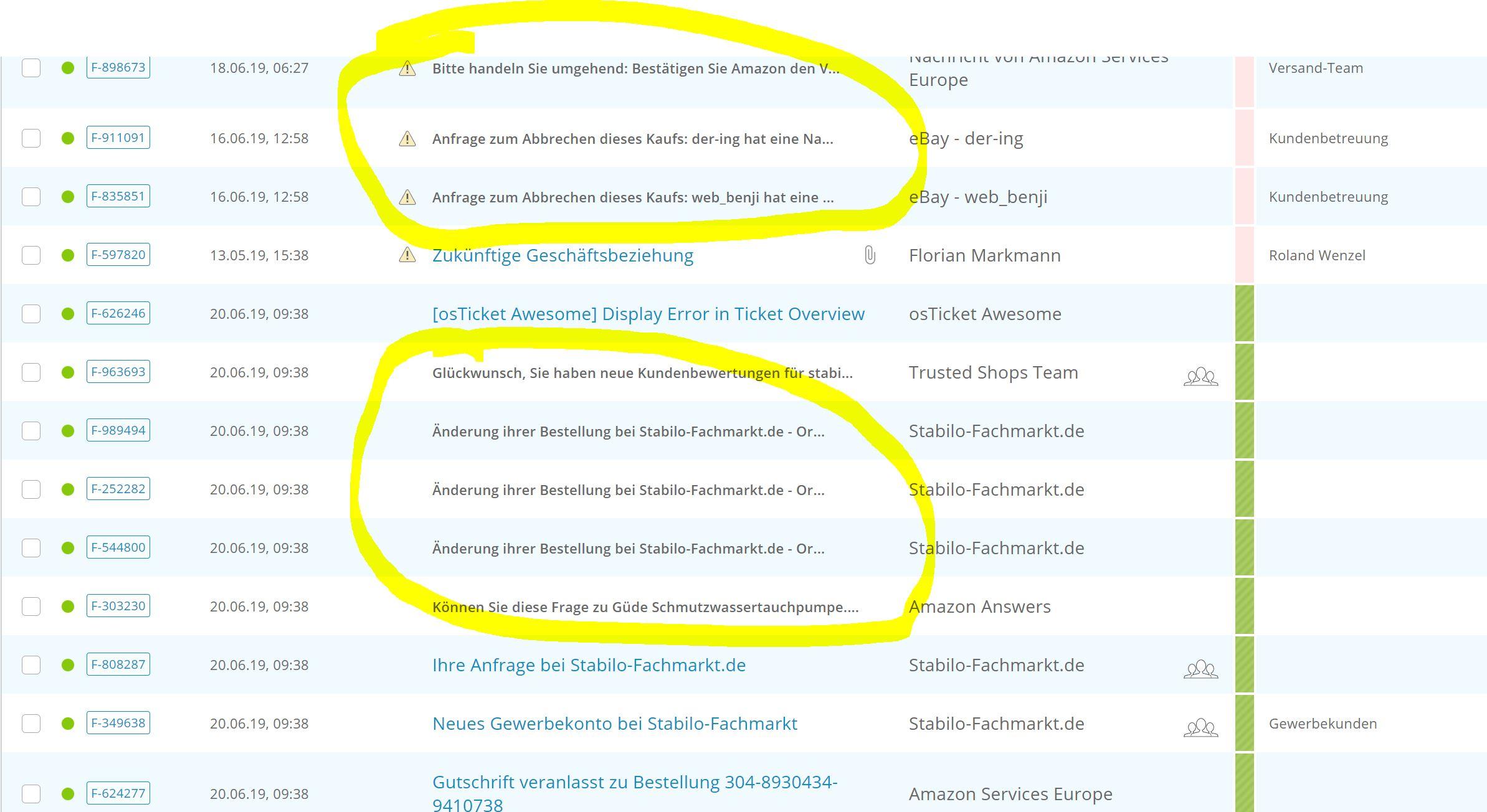
That was easy …
Easy for you. : P
I cannot click the Topics we can see in black color… whats going wrong here?
I don't know. Are those tickets from a different source than the others (such as email)?
Do you still have a backup of your original osTicket directory to compare? If yes, what is the URL please?
For example, if your osTicket was originally https://mydomain.com/support, then the first step in the osTicket Awesome installation instructions is to rename it to https://mydomain.com/support-old.
---
BTW (in case you haven't realized this yet), you can still click on the Ticket # for now to view the ticket.

I can confirm the attachment plugin as the cause of this error. I was seeing the same code after viewing a ticket & then browsing back to the agent panel / ticket overview. After disabling the plugin the error messages are gone.
I figured out what is going on with your second issue.
All of the ticket subjects that have lost their link are really long and have been truncated using jQuery.
Unfortunately, for whatever reason, the jQuery is behaving differently within your installation and is stripping away the anchor tags.
It is a really easy fix.
Open /include/staff/templates/queue-tickets.tmpl.php.txt and change line 355 from
jQuery(".truncate").each(function(i, value) {
to
jQuery(".truncate a").each(function(i, value) {
Yes, i have a backup of my osticket installation, but it was just local.
Now i have tried you jquery fix and it workus just perfect.
Many thanks again for your fast help and solution.
👌