
Have you checked these first?
Help us help you: include your environment details. We've made this easy for you. Use the Copy System Info button in Admin Panel › osAwesome › Diagnostics, then paste below.

Note: Never paste the contents of your ost-config.php file here; it holds your database credentials.
Two quick checks before posting: try clearing your browser cache, and press SHIFT+O on any Staff Panel page to enter Safe Mode (a stock osTicket with no enhancements). If the problem still shows in Safe Mode, it's in osTicket itself, not osTicket Awesome. But let us know about the issue either way.
Help us help you: include your environment details. We've made this easy for you. Use the Copy System Info button in Admin Panel › osAwesome › Diagnostics, then paste below.
This forum is public. Never post order numbers, full license keys, email addresses, or payment details.
This is the place for general questions about how billing and licensing work — renewals, activation, staging slots, plan differences, and what happens when a license lapses.
For anything tied to your specific account, refund, or payment, contact us directly instead.

I see in the demo there are avatars, is it possible to make these actual pictures? We like the theme and think if we can have staff pictures as our avatar's it would be great.
Thanks,

Excellent question, JCOLLINS005.
The osTicket devs added limited avatar support in the 1.10.x Release Candidates. At this time, each user is assigned a randomly-generated avatar that is a composite of different elements.
At this time, only the user his or herself can change the avatar. To do so, click the Profile link at the top of the page while logged into the Staff side. Then click the "Change" button.
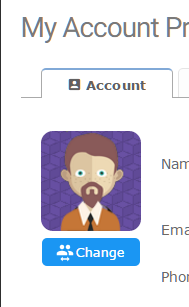
Note, however, that this only generates a new, random composite. There is no function to upload and self-assign a photo a specific image.
This is a part of osTicket's core functionality in v1.10-RC.x. All I've done with osTicket Awesome is make the available avatars more interesting (as least, in my own opinion).
Like I said, this is a new and rather limited feature. It does appear that there are plans to expand on this feature, which includes the ability to upload images directly to the osTicket installation and/or possibly by uploading them to the third-party service gravatar.com.
https://github.com/osTicket/osTicket/issues/2436
Also note that this feature is not available and is not planned for v1.9.x.
One other possibility comes to mind if you would like to use staff photos right away, but it is contingent upon a couple of prerequisites:
1) You have more more than 10 staff members
2) Your end-users (clients) do not log into the system
If these conditions are true, you could
a) open images/avatar-sprite-ateam.png in Photoshop
b) replace the existing cartoon faces with your staff images
c) delete everything below the faces, leaving the transparent background
d) save, upload to your osTicket Awesome installation, overwriting the original
e) have each of your users login, go to Profile and click "Change" until they arrive at their own photo
The reason you wouldn't want to do this if you have clients using the ticket system is that each user would be assigned a random photo of one of your staff members. Which would be a bit weird, ya?
BTW my prediction was correct. The avatar photos can now be assigned by binding an image to the agent's email address through gravatar.com.


Hello,
My 'Change' button is missing.
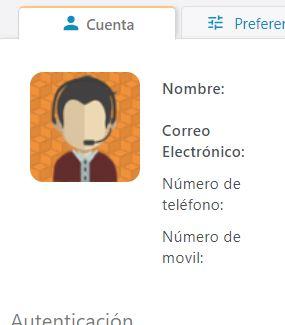
I've realized that it performs an AJAX call, so i checked that cgi.fix_pathinfo is already set to 1 at php.ini

It has been also tested on Firefox
These are my settings
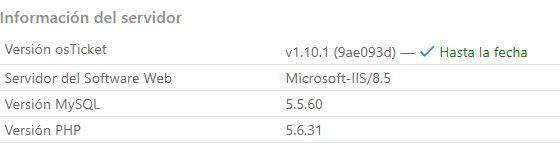
What could be the cause?
Thanks in advance
Thanks for your detailed report, @aeromarine.
That's odd.
My first suggestion would be to try another browser, but it sounds like you already have.
Can you please visit the profile page in Chrome and open Dev Tools > Console and see if there are any errors?
I notice that you are using IIS. Hey @kkrumm... you use IIS as well. Would you kindly check your profile page to see if the button appears on your end?
Yes, its the same for me as well. I thought the only way to change the avatar was through gravatar.com and linking the email address.
Hey @kkrumm this is what it should look like:
https://osticketawesome.com/1.10.1/scp/profile.php
The button below the picture allows the user to create a new random composite. It is kind of like playing a slot machine. This is in lieu of using a profile picture through Gravatar.
Do you still have a vanilla osTicket installation on your server? If yes, would you mind looking at your profile page in the vanilla osTicket and letting me know if the button shows up or not? Thanks!
@stevland I'm not running vanilla. Just osticket v1.10.1 with Awesome v1.3. I logged in and still dont see it.
Okay i think i see it now. My bad I needed to have this setting changed first Agents Settings -> Avatar Source: "Buil-In / Oscar's A-Team".
Now I have the option to flip through the avatar images.
Ah, good work @kkrumm. Thank you for your help! That eliminates the possiblity that @aeromarine's missing button is related to running on an IIS server.
@aeromarine, have you tried visiting the profile page in Chrome and open Dev Tools > Console and see if there are any errors?
Hi,
Sorry for the late reply. Fixed when selecting Oscar's A-Team built-in avatar option.
Thank you @svetland and @kkrumm!