
Have you checked these first?
Help us help you: include your environment details. We've made this easy for you. Use the Copy System Info button in Admin Panel › osAwesome › Diagnostics, then paste below.

Note: Never paste the contents of your ost-config.php file here; it holds your database credentials.
Two quick checks before posting: try clearing your browser cache, and press SHIFT+O on any Staff Panel page to enter Safe Mode (a stock osTicket with no enhancements). If the problem still shows in Safe Mode, it's in osTicket itself, not osTicket Awesome. But let us know about the issue either way.
Help us help you: include your environment details. We've made this easy for you. Use the Copy System Info button in Admin Panel › osAwesome › Diagnostics, then paste below.
This forum is public. Never post order numbers, full license keys, email addresses, or payment details.
This is the place for general questions about how billing and licensing work — renewals, activation, staging slots, plan differences, and what happens when a license lapses.
For anything tied to your specific account, refund, or payment, contact us directly instead.

Hi togehter,
since V1.17.2 we faced with the issue that a user that is logged in into the user frontend will be suddenly logged out.
So when a customer/user is logged in in his customer area to view all the tickets and he clicks on "Profile" for example,
then the session expired suddenly and the user has to login again.
This behaivor we also see when the user create a new ticket
So any hint on this would be appreciate!
Regards, Norman

Same here .. would be nice if someone could help

To be honest this sounds like an vanilla osTicket issue, not anything to do with osTicket Awesome.
I'm willing to try and sort out if that's the case or not. But I can't seem to reproduce this issue in the osTicket Awesome client demo. Can you?
Are either of you guys using OAuth2 by chance?
Hey Stevland,
tested with OAuth2. Same problem.
Only happens (here) when Users edits tickets in the frontend and tries to save them.
Then you get back to the login screen and it looks like you have to log in again. If you hit refresh on your keyboard you are still logged in...
Sincerely
The reason I asked if you're using OAuth2 is that what you have both described sounds like this issue:
https://forum.osticket.com/d/102248-microsoft-oauth-returning-to-homepage-without-user-logged-in/22
I can't really help you with this (other than pointing you in the right direction) as I don't use OAuth2 myself, and as this issue doesn't have anything to do with osTicket Awesome it is way beyond the level of support I can offer.
I will mark this as 'Resolved', but you can still comment if you feel that I've made a mistake.
I hope you get this sorted out soon. Good luck.
Hey Beon..
it seems like it was a permission problem.
set Files of "API" Directory to 755 and Problem is solved.
@ Steveland: as i mentioned in my other Ticket the osticketawesome zip release is messed up when unzipping it via Plesk.
If you unzip the original osticket release via plesk, everything is fine with default permissions. osticketawesome is 644 with all directories by default. Something has been changed since 1.1xxx.
Hi Kleins,
no, this is not a permission issue. This is an issue in class.usersession.php:
This solved the user logged out issue:
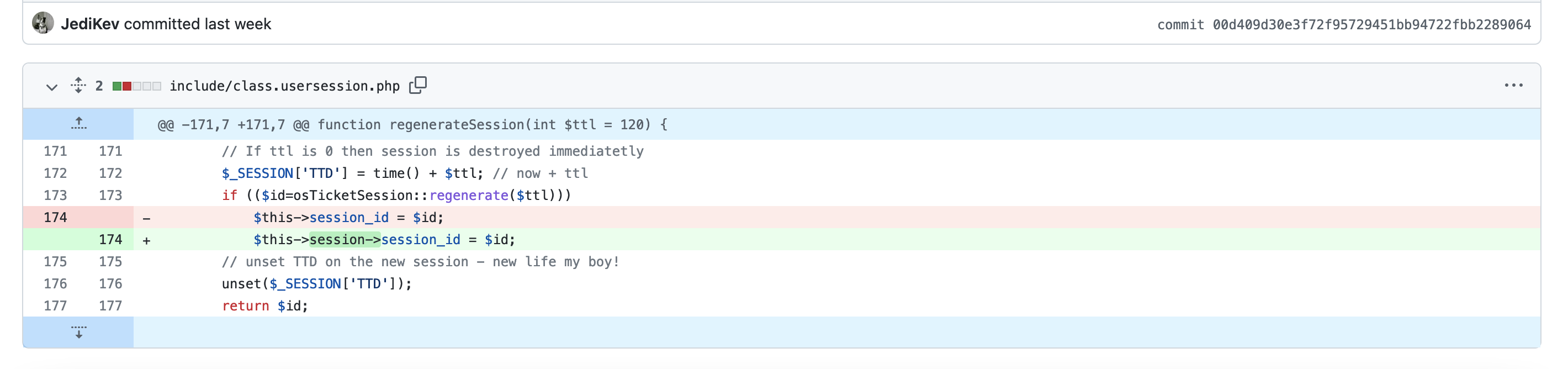
regards

Hi,
This have solve the issue I was having too.
Issue is back.