
Have you checked these first?
Help us help you: include your environment details. We've made this easy for you. Use the Copy System Info button in Admin Panel › osAwesome › Diagnostics, then paste below.

Note: Never paste the contents of your ost-config.php file here; it holds your database credentials.
Two quick checks before posting: try clearing your browser cache, and press SHIFT+O on any Staff Panel page to enter Safe Mode (a stock osTicket with no enhancements). If the problem still shows in Safe Mode, it's in osTicket itself, not osTicket Awesome. But let us know about the issue either way.
Help us help you: include your environment details. We've made this easy for you. Use the Copy System Info button in Admin Panel › osAwesome › Diagnostics, then paste below.
This forum is public. Never post order numbers, full license keys, email addresses, or payment details.
This is the place for general questions about how billing and licensing work — renewals, activation, staging slots, plan differences, and what happens when a license lapses.
For anything tied to your specific account, refund, or payment, contact us directly instead.

Hello,
In my current setup, the priority column shows text values like “Normal” or “High”. However, in the demo, priorities are displayed as color blocks without any text — which looks cleaner and is easier to scan visually.
Could you check if this visual style can be applied to my instance as well?
Thanks!
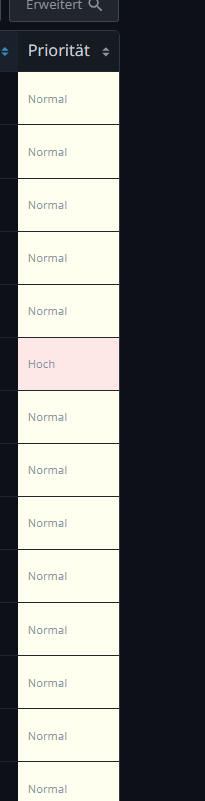

Einstellungen -> Tickets -> Übersichten -> Übersicht auswählen (z.B. "Offen") -> Spalten -> bei Priorität auf "Konfiguration" klicken -> Name zu "Priority" ändern (statt Priorität).
The Name of the Datasource for the Column Priority is expected to be in english.

Thank you for posting this, Detlev Engelhardt. And chrswsmn, your workaround is exactly right.
The color-block priority column only shows up when that column's name is the English word "Priority". On a German install the column is named "Priorität", so osTicket Awesome doesn't recognize it and falls back to plain text. That's what Detlev is seeing. The same issue exists in any language that isn't English.
Workaround (thanks chrswsmn): edit the queue column and set its name to "Priority" (English). Go to Admin Panel → Manage → Ticket Queues, open the queue, select the Priority column, and set the name to "Priority". The color blocks and icon header come back.
We've now fixed this properly and it will be included in the next release (osTicket-1.18.3-Awesome-107). I will post an update here when that is available.
Hi Detlev,
Apologies for the wait on this one. It took longer to land than we'd hoped.
The fix has shipped. The color-coded priority column now renders correctly no matter what language your install runs in — it's no longer tied to the literal English word "Priority," so it'll work on your German install without the workaround.
One thing on the version number: we'd said this would land in osTicket-1.18.3-Awesome-107. In the meantime osTicket put out a security release (1.18.4), so we rebased onto it and reset our build number — what we'd planned as -107 shipped as osTicket-1.18.4-Awesome-101. Same fix, new base. As a bonus it also rolls up osTicket's June 2026 security patches, so it's worth grabbing regardless.
You'll find it in My Account → Downloads, and the release notes are here: https://osaweso.me/documentation/release-history/#1-18-4-awesome-101
After upgrading you can name the Priority column whatever you like in German — the workaround is no longer needed.
Thanks again for the clear report, and thanks to chrswsmn for the workaround in the meantime. You're both credited in the release notes.