
Have you checked these first?
Help us help you: include your environment details. We've made this easy for you. Use the Copy System Info button in Admin Panel › osAwesome › Diagnostics, then paste below.

Note: Never paste the contents of your ost-config.php file here; it holds your database credentials.
Two quick checks before posting: try clearing your browser cache, and press SHIFT+O on any Staff Panel page to enter Safe Mode (a stock osTicket with no enhancements). If the problem still shows in Safe Mode, it's in osTicket itself, not osTicket Awesome. But let us know about the issue either way.
Help us help you: include your environment details. We've made this easy for you. Use the Copy System Info button in Admin Panel › osAwesome › Diagnostics, then paste below.
This forum is public. Never post order numbers, full license keys, email addresses, or payment details.
This is the place for general questions about how billing and licensing work — renewals, activation, staging slots, plan differences, and what happens when a license lapses.
For anything tied to your specific account, refund, or payment, contact us directly instead.

Hello all,
When responded or new ticket hasn't had a response, is there a possibility to make this be a specific colour?
For example, when you get an email, it highlights in bold, when responded it fades out.
How do we do this?

Hi @netctrlsupport,
If I am understanding you correctly, you'll find that a similar feature has been added to the latest release, available now. Check out this page from the demo.
Tickets with a new reply now have an animated green icon to the left of the ticket number.
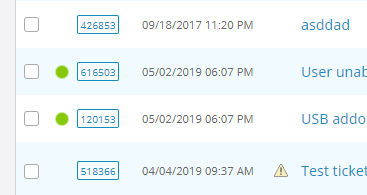
Hopefully this is an adequate solution for your needs. But if you still want to know how to make the subject line bold, let me know.
As you may have noticed I revamped this website. But I lost a few forum posts in the shuffle.
It appears that one of the missing ones is from you. I have this email notification:
netctrlsupport wrote:
Perfect! thank you!
Got a new issue now unfortunately.
In the agent login, it says OSTicket Awesome which is clickable, how do I remove this? or edit this?
All you have to do is change your company logo in Admin Panel > Theme Options. I would have thought that would have been obvious though, which makes me wonder if I am understanding your question correctly. Let me know if I'm not.