
Have you checked these first?
Help us help you: include your environment details. We've made this easy for you. Use the Copy System Info button in Admin Panel › osAwesome › Diagnostics, then paste below.

Note: Never paste the contents of your ost-config.php file here; it holds your database credentials.
Two quick checks before posting: try clearing your browser cache, and press SHIFT+O on any Staff Panel page to enter Safe Mode (a stock osTicket with no enhancements). If the problem still shows in Safe Mode, it's in osTicket itself, not osTicket Awesome. But let us know about the issue either way.
Help us help you: include your environment details. We've made this easy for you. Use the Copy System Info button in Admin Panel › osAwesome › Diagnostics, then paste below.
This forum is public. Never post order numbers, full license keys, email addresses, or payment details.
This is the place for general questions about how billing and licensing work — renewals, activation, staging slots, plan differences, and what happens when a license lapses.
For anything tied to your specific account, refund, or payment, contact us directly instead.

osTicket v1.14.1 // osTicket-1.14.1-Awesome-102
When looking at ticket queues the ticket number is not displayed. Also the same on the mobile version.
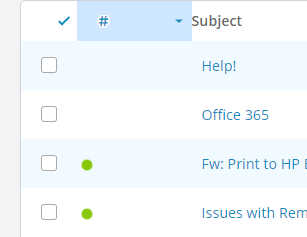
I've managed to fix it. Updated to the latest OSTicket and theme then all was well.
Actually on further inspection I don't seem to have completely fixed it. The number is there but it has some random spaces and returns after it which is throwing out the formatting of the table. I've highlighted it in the image attached to try and make it a bit clearer.
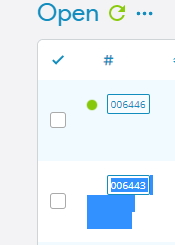

Sorry, I overlooked this somehow.
Are you still having this issue? If yes. please try clearing your browser cache and let me know if that fixes it or not.
@stevland thanks for the reply. Tried a browser cache clear and different browsers but unfortunately still the same.
I haven't heard back from you in a while, so I will mark this as resolved. But you can still post an update here if you wish.
Sorry I missed this. Just filled in the form now.
Hi @staidans,
Thank you for granting me access to your installation.
For some reason the ticket # is getting wrapped in an additional tag in your system that is messing up it's padding.
I couldn't figure out why this is happening, but the good news it that it was easy enough to fix. I simply added the following to your Custom CSS:
.osta_ticket .truncate {
white-space: initial !important;
}
Have added this CSS property to the next release so that no one else will experience this issue in the future.
Awesome! Thanks for the update.