

Thank you, I submitted the form for you.

Thank you for doing that. I will have a look in the next few hours and report back.
Wow. I honestly don't know what the problem was. All of your files are intact. I couldn't find any reason that those translations shouldn't work.
There are two very small possibilities that come to mind.
I wonder if you are running any caching software on your server, in order to speed things up? Sometimes caching software can conflict with osTicket's translation functions.
I also notice that you are running PHP 7.4. You should consider downgrading to 7.3 as osTicket does not yet support 7.4 and running it can cause weird things to happen.
In the end I had to give up trying to understand this issue and I simply hard-coded the translations into the /index.php file for you.
In the future after you upgrade if those translations stop working again copy /support-old/index.php to /support and you'll be good-to-go.
Dear Stevland!
Thank you for your efforts. Due to other plugins it is not an option to downgrade to php 7.3, but this hardcoded solution is more than good for us for the time being.

Hello,
I have a similar problem with the german translation.
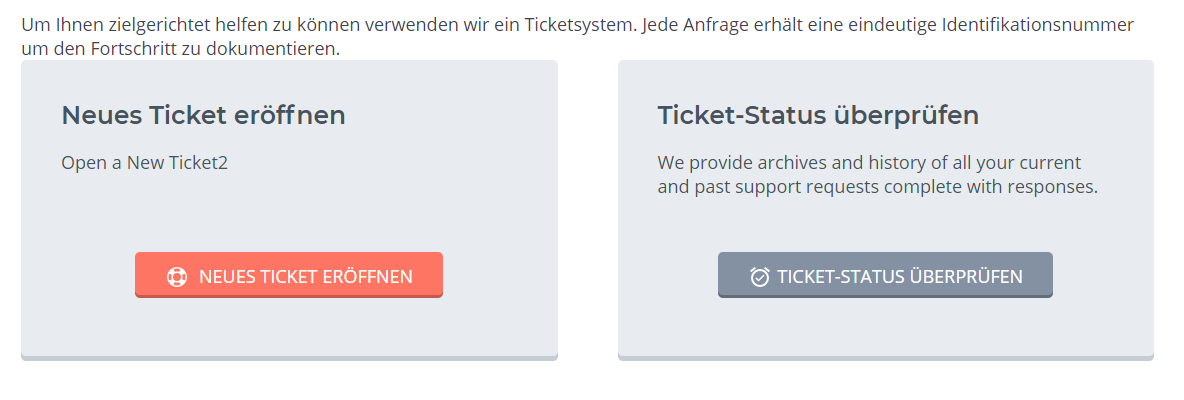
The texts are not translated, similar to the hungarian version. I tried to add a custom translation and added this line to
include\i18n\de\LC_MESSAGES\messages.mo.php
'Create New Ticket2' => 'Neues Ticket eröffnen',
But its not recognized as a new translation (as you can see in the screenshot). I downgraded to php 7.3 as you recommended, but its the same result.
Can you help me?
Thank you very much!
I can provide you SFTP access