
Have you checked these first?
Help us help you: include your environment details. We've made this easy for you. Use the Copy System Info button in Admin Panel › osAwesome › Diagnostics, then paste below.

Note: Never paste the contents of your ost-config.php file here; it holds your database credentials.
Two quick checks before posting: try clearing your browser cache, and press SHIFT+O on any Staff Panel page to enter Safe Mode (a stock osTicket with no enhancements). If the problem still shows in Safe Mode, it's in osTicket itself, not osTicket Awesome. But let us know about the issue either way.
Help us help you: include your environment details. We've made this easy for you. Use the Copy System Info button in Admin Panel › osAwesome › Diagnostics, then paste below.
This forum is public. Never post order numbers, full license keys, email addresses, or payment details.
This is the place for general questions about how billing and licensing work — renewals, activation, staging slots, plan differences, and what happens when a license lapses.
For anything tied to your specific account, refund, or payment, contact us directly instead.

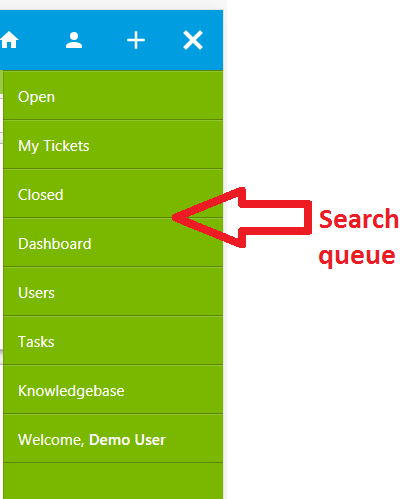
In mobile version there's no "queue" tab with saved searches. I figured out that savedsearches is like an extra nav submenu in desktop version. If you'd be able to provide a fix so that our agents can use their search queues it would help us a lot.
Thank you.

I'm sorry if I'm missing something, but this functionality already exists in osTicket Awesome.
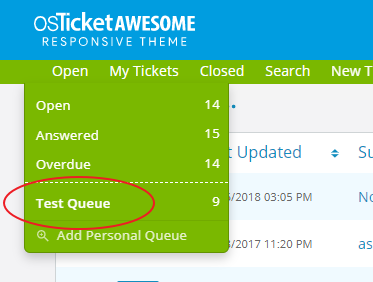
I add a Personal Queue. It shows up in the desktop navigation, of course:
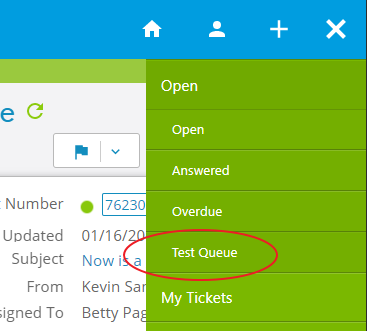
And it also shows up as a subnav item of Open in the mobile layout:
I am also confused by your use of the term Search Queue, as that is something different. So we must be miscommunicating.
Please clarify your question.
I wanted to use the terms as they were used in the sources. Maybe "Search Queue" is ambigous or wrong but I meant those queues that are accessable through "Search" in the subnavigation. It's also part of your screenshot, see:
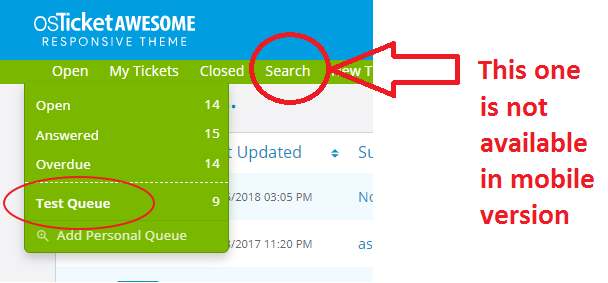
When our agents make queues that are highly customized or just temporarly interesting, they don't set a parent queue but just save them as "My Search" / "Personal Search":
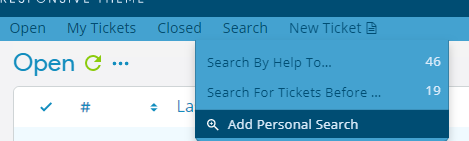
For instance, all tickets that should not use any of the parent filters (open, mine, closed) must become what I call "Search Queues".
To open a saved "Personal Search" you tab "Search" in Subnavigation. But that's simply not possible in mobile version, is it?
I see what you are saying now!
The whole osTicket navigation system was revamped in v1.11. I can't recall why I didn't include search in osTicket Awesome's mobile navigation. Two possibilities come to mind:
- I already had a Search field and an Advanced Search button in place, so I may have decided that these were adequate. If this is the case, I either didn't realize that I was leaving out the Personal Search items in the mobile navigation, or I figured this feature wouldn't be terribly missed (please note that it has never been my intention for the mobile layout to have 100% of the functionality that the desktop version has).
- The new osTicket code that generates the navigation items is actually quite sophisticated. On my end it required quite a bit of hackery to transpose it into osTicket Awesome's mobile navigation. I brought in a full-time PHP programmer to help work out the bugs. It is possible that we just could not get the Search functionality to cooperate.
tl;dr I can't recall exactly why Search is missing from the mobile navigation. I will look into this and see what I can come up with and I will eventually let you know. Sorry, I can't promise that it will happen soon (or even at all).
There is an easy workaround for this though. When you click on a Personal Search in desktop layout you'll notice the URL:
/scp/tickets.php?queue=20
Therefore, your staff can easily create bookmarks in their mobile web browser for their Personal Searches.
I hope this helps.