
Have you checked these first?
Help us help you: include your environment details. We've made this easy for you. Use the Copy System Info button in Admin Panel › osAwesome › Diagnostics, then paste below.

Note: Never paste the contents of your ost-config.php file here; it holds your database credentials.
Two quick checks before posting: try clearing your browser cache, and press SHIFT+O on any Staff Panel page to enter Safe Mode (a stock osTicket with no enhancements). If the problem still shows in Safe Mode, it's in osTicket itself, not osTicket Awesome. But let us know about the issue either way.
Help us help you: include your environment details. We've made this easy for you. Use the Copy System Info button in Admin Panel › osAwesome › Diagnostics, then paste below.
This forum is public. Never post order numbers, full license keys, email addresses, or payment details.
This is the place for general questions about how billing and licensing work — renewals, activation, staging slots, plan differences, and what happens when a license lapses.
For anything tied to your specific account, refund, or payment, contact us directly instead.

Hi, I hope this screenshot from the staff demo is self-explaining:
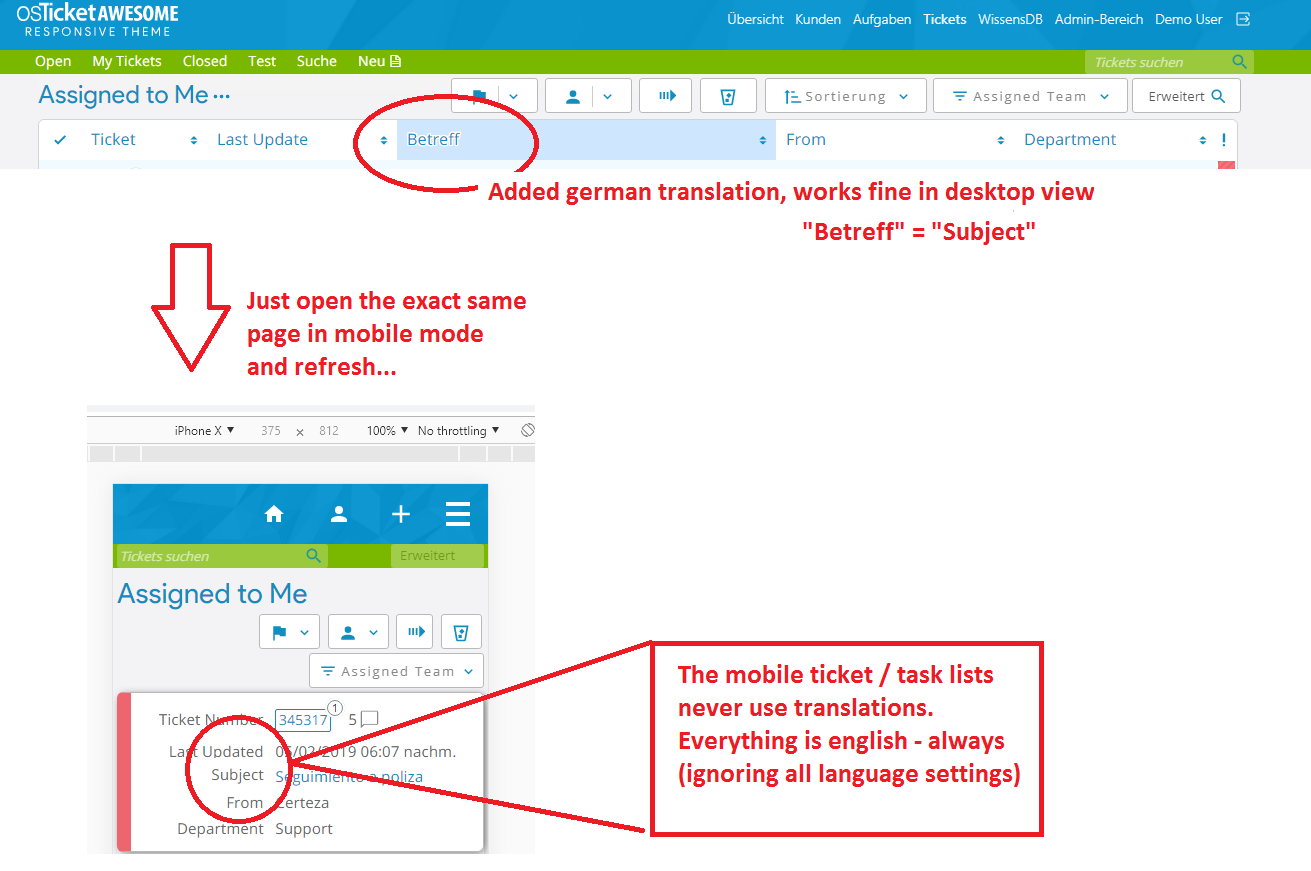

Thank you for the screenshots... very easy to understand!
I forgot to include those translations. I am working on it right now.
I'm curious... are these translations from Google really bad?
Ticket Number
Last Updated
Subject
From
Assigned To
Due Date
Close Date
Date Created
Department
Last Message
Last Response
Status
Team
Ticketnummer
Letzte Aktualisierung
Gegenstand
Von
Zugewiesen an
Geburtstermin
Abschlussdatum
Datum erstellt
Abteilung
Letzte Nachricht
Letzte Antwort
Status
Mannschaft
I'll have a patch ready tonight or tomorrow with all languages. But if you want a quick fix for German you can add the following to /osta/user-styles.css:
html[lang="de"] .list td.osta_ticket:before { content: "Ticketnummer";}
html[lang="de"] .list td.osta_lastupdated:before { content: "Letzte Aktualisierung";}
html[lang="de"] .list td.osta_subject:before { content: "Gegenstand";}
html[lang="de"] .list td.osta_username:before { content: "Von";}
html[lang="de"] .list td.osta_assignee:before { content: "Zugewiesen an";}
html[lang="de"] .list td.osta_duedate:before { content: "Geburtstermin";}
html[lang="de"] .list td.osta_closedate:before { content: "Abschlussdatum";}
html[lang="de"] .list td.osta_datecreated:before { content: "Datum erstellt";}
html[lang="de"] .list td.osta_department:before { content: "Abteilung";}
html[lang="de"] .list td.osta_lastmessage:before { content: "Letzte Nachricht";}
html[lang="de"] .list td.osta_lastresponse:before { content: "Letzte Antwort";}
html[lang="de"] .list td.osta_status:before { content: "Status";}
html[lang="de"] .list td.osta_team:before { content: "Mannschaft";}
Ticketnummer<br />
Letzte Aktualisierung<br />
Gegenstand Betreff<br />
Von<br />
Zugewiesen an<br />
Geburtstermin (that would be the predicted day of baby birth) Fällig am / Fälligkeitsdatum<br />
Abschlussdatum (would be technically ok, better is:) Geschlossen am / Schließdatum<br />
Datum erstellt (would be technically ok, better is:) Erstellt am / Erstelldatum<br />
Abteilung<br />
Letzte Nachricht<br />
Letzte Antwort<br />
Status<br />
Mannschaft Team is fine
A patch during the next days would be fine, I'll wait. Thank you for your fast response!
Cool. Thanks for your patience.
You have given me too many options. I can only use one translation after all. Should I go with these?
Fällig am
Geschlossen am
Erstellt am
Wait, do you have to do all translations within the code? You're not using the custom namings / translations as they are configured in the ticket overview...? However, you can go with those translations, yes 😉
The way the ticket list table now displays in mobile view involved some advanced hackery. Long story short the only way to display the table headers (i.e. "Ticket Number", "Last Updated", etc.) is through CSS. So I have to re-code all of the headings for every language pack into CSS as you see above.
I do have a way of automating the task using Google Translate, but you made me realize that that is giving poor translations. So now I am manually copying and pasting the user translated text that is already included in the osTicket language packs.
So far I have 3 complete and 42 left to go. 🙁
Speaking of which, if you see any of my osTicket Awesome Google translations (especially in the Agent Panel > Theme section) that can be improved, please feel free to make suggestions. Thank you!
This issue has been fixed in the new release, available now. Thank you for your contribution.

Please and for the italian translation?
Same issue always in English.
PLease How to?
Hi @enrico,
Unfortunately a bunch of the translations are broken in osTicket v1.12.3, which I have reported here:
https://github.com/osTicket/osTicket/issues/5098
This affects what you'll see in the desktop layout in osTicket Awesome. But it is an osTicket issue, not an osTicket Awesome issue. Hopefully it will be fixed when they release v1.12.4.