
Have you checked these first?
Help us help you: include your environment details. We've made this easy for you. Use the Copy System Info button in Admin Panel › osAwesome › Diagnostics, then paste below.

Note: Never paste the contents of your ost-config.php file here; it holds your database credentials.
Two quick checks before posting: try clearing your browser cache, and press SHIFT+O on any Staff Panel page to enter Safe Mode (a stock osTicket with no enhancements). If the problem still shows in Safe Mode, it's in osTicket itself, not osTicket Awesome. But let us know about the issue either way.
Help us help you: include your environment details. We've made this easy for you. Use the Copy System Info button in Admin Panel › osAwesome › Diagnostics, then paste below.
This forum is public. Never post order numbers, full license keys, email addresses, or payment details.
This is the place for general questions about how billing and licensing work — renewals, activation, staging slots, plan differences, and what happens when a license lapses.
For anything tied to your specific account, refund, or payment, contact us directly instead.

when a logged on user tries to open a ticket the following error message appears (on sending the ticket) in osticket.error.log:
PHP Fatal error: Uncaught OrmException: ClientAccount: timezone: Field not defined in /var/www/osTicket/upload/include/class.orm.php:413\nStack trace:\n#0 /var/www/osTicket/upload/include/class.orm.php(417): VerySimpleModel->get()\n#1 /var/www/osTicket/upload/include/class.user.php(1212): VerySimpleModel->__get()\n#2 /var/www/osTicket/upload/include/class.user.php(341): UserAccount->getTimezone()\n#3 /var/www/osTicket/upload/include/class.client.php(221): User->getTimezone()\n#4 /var/www/osTicket/upload/include/class.client.php(221): EndUser->__call()\n#5 /var/www/osTicket/upload/include/class.config.php(360): EndUser->__call()\n#6 /var/www/osTicket/upload/include/class.schedule.php(102): OsticketConfig->getTimezone()\n#7 /var/www/osTicket/upload/include/class.schedule.php(106): Schedule->getTimezone()\n#8 /var/www/osTicket/upload/include/class.businesshours.php(99): Schedule->getDatetimeZone()\n#9 /var/www/osTicket/upload/include/class.schedule.php(479): BusinessHours->addWorkingHours()\n#10 /var/www/osTicket/upload/include/class.sla.php(55): BusinessHoursSchedule->addWorkingHours()\n#11 /var/www/osTicket/upload/include/class.ticket.php(557): SLA->addGracePeriod()\n#12 /var/www/osTicket/upload/include/class.ticket.php(568): Ticket->getSLADueDate()\n#13 /var/www/osTicket/upload/include/class.ticket.php(4538): Ticket->updateEstDueDate()\n#14 /var/www/osTicket/upload/open.php(45): Ticket::create()\n#15 {main}\n thrown in /var/www/osTicket/upload/include/class.orm.php on line 413, referer: [company domain]/tickets.php
a similar error also apears whenever a user logs in and the ticket.php is automatically opened:
PHP Fatal error: Uncaught OrmException: ClientAccount: timezone: Field not defined in /var/www/osTicket/upload/include/class.orm.php:413\nStack trace:\n#0 /var/www/osTicket/upload/include/class.orm.php(417): VerySimpleModel->get()\n#1 /var/www/osTicket/upload/include/class.user.php(1212): VerySimpleModel->__get()\n#2 /var/www/osTicket/upload/include/class.user.php(341): UserAccount->getTimezone()\n#3 /var/www/osTicket/upload/include/class.client.php(221): User->getTimezone()\n#4 /var/www/osTicket/upload/include/class.client.php(221): EndUser->__call()\n#5 /var/www/osTicket/upload/include/class.config.php(360): EndUser->__call()\n#6 /var/www/osTicket/upload/include/class.format.php(853): OsticketConfig->getTimezone()\n#7 /var/www/osTicket/upload/include/client/tickets.inc.php(260): Format::date()\n#8 /var/www/osTicket/upload/tickets.php(147): include('...')\n#9 {main}\n thrown in /var/www/osTicket/upload/include/class.orm.php on line 413, referer: [company domain]/login.php
The problem is that this also causes the users to be unable to see their tickets. They only see the Tickets page, but without all their tickets.

Hi Christian,
- Which version of osTicket Awesome are you running?
- Is this a fresh install or an upgrade from a previous version?
- What version of PHP?
- I've never heard of osticket.error.log.
- Are you referring to your server's Apache / PHP error logs?
- Or perhaps the Admin Panel > Dashboard > System Logs?
- What happens if your agent presses SHIFT + O and enters old osTicket mode before trying to open a ticket?
Hi Stevland,
- we are running Version 1.18.3 (most recent release)
- this is an upgrade from 1.18.1
- we are on PHP 8.2.29
- I am refering to the Apache / PHP error logs
- If the client enters old osTicket mode and opens a ticket the same thing happens.
- Did the system work correctly on 1.18.1? Could logged-in users open tickets without errors? (I assume yes, but just checking).
- Does this happen for all logged-in users, or just specific ones?
- Can you run this SQL and share the result?
DESCRIBE ost_user_account;
- As far as i know the eror already appeared on 1.18.1
- I assume so, as i have tested this on multiple real customer accounts and a fresh test account.
- A screenshot of the result of DESCRIBE ost_user_account:
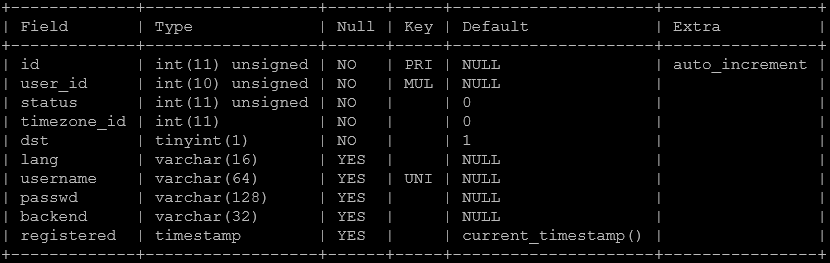
Does anyone have any Idea how to solve this error? I need to fix this as soon as possible.
Hi Christian,
Good news: I've identified the problem.
Your ost_user_account table is missing the timezone column, which was introduced in a recent osTicket core update. It appears the database migration during your upgrade from 1.18.1 to 1.18.3 didn't complete successfully.
Run this in your MySQL console:
ALTER TABLE ost_user_account ADD COLUMN \timezone\varchar(64) DEFAULT NULL AFTER \status\;
Now, I have to be transparent with you. When you confirmed that the same error occurs in old osTicket mode (SHIFT+O), that tells us this is an upstream osTicket core issue, not an osTicket Awesome issue. Normally I would direct you to the osTicket community forum at that point, because I simply cannot troubleshoot core osTicket problems for all of my customers. If I did, I wouldn't have any time left to actually develop osTicket Awesome!
I overlooked your answer to my fifth question above, so I kept digging when I should have pointed you upstream. Since I've already found the answer, it would be silly not to share it. But please understand this is a one-time courtesy, not a service that comes with osTicket Awesome. I also assume no liability if something goes wrong with the above query. Please back up your database before running it.
For future reference, any issue that also occurs in old osTicket mode (SHIFT+O) is by definition an upstream issue. The best place for those is the osTicket community forum:
https://forum.osticket.com/
Hope this gets you sorted!