Free Until It Isn’t.
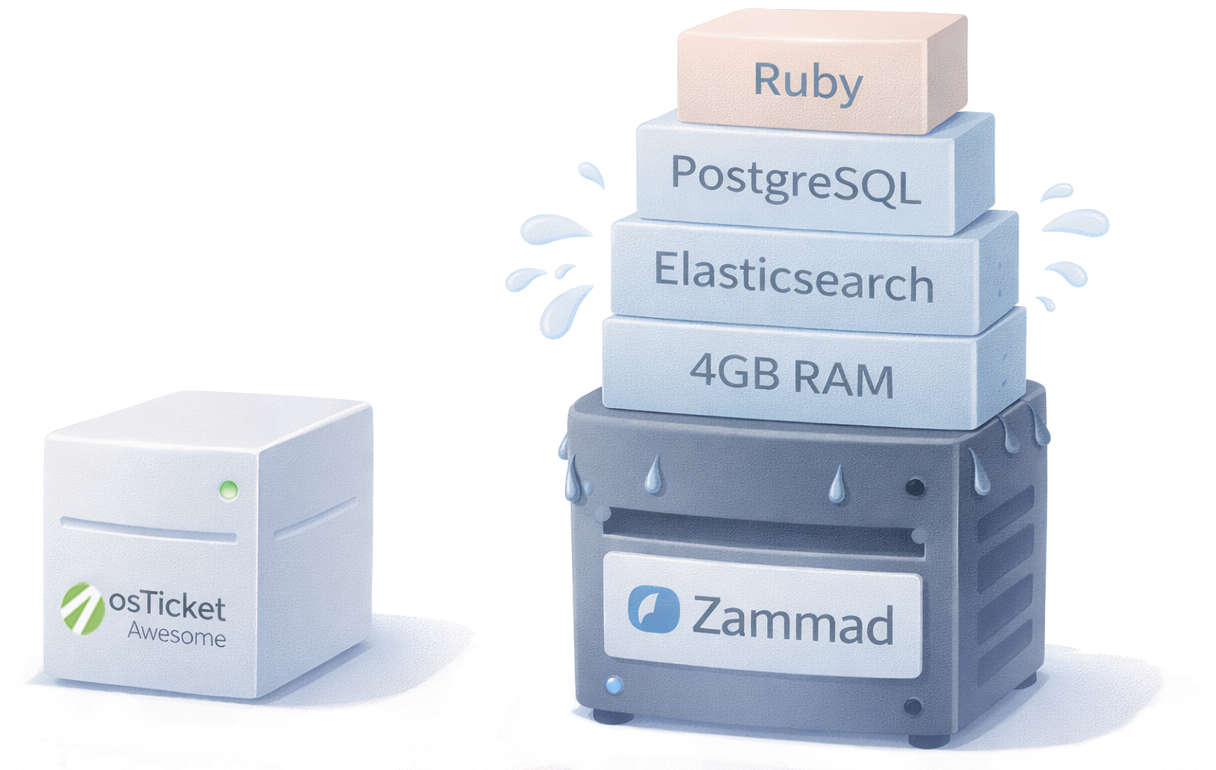
Zammad is free to download. Then you meet Elasticsearch.
osTicket Awesome is lightweight and runs on any PHP host.
Zammad is a good product. This page isn’t a takedown.
Zammad is a capable, modern, open-source helpdesk with a clean UI, built-in multichannel support, and an active development team. If you’re evaluating self-hosted open-source options, Zammad belongs on your shortlist.
So does osTicket Awesome. The differences below are real, and they matter more than you’d expect when you’re the one maintaining the server.
osTicket Awesome runs on any PHP host. Zammad needs a dedicated stack.
This is the biggest practical difference between the two products, and it affects everything downstream: hosting cost, upgrade complexity, maintenance burden, and who on your team can actually administer the thing.
| osTicket Awesome | Zammad | |
|---|---|---|
| Language | PHP | Ruby |
| Database | MySQL / MariaDB | PostgreSQL |
| Search engine | Built-in | Elasticsearch (required) |
| Minimum server | 1 GB RAM, shared hosting viable | 4+ GB RAM, VPS minimum |
| Hosting cost | $5–$20/month | $20–$60/month |
| Installation | Extract to web root, run setup wizard | Docker Compose or manual package install |
| Update process | Back up config, upload files, restore config | Package update + potential ES reindex |
osTicket Awesome runs on the same LAMP/LEMP stack that powers most of the web. If your organization runs WordPress, Drupal, or any PHP application, you already have the infrastructure. A $5/month VPS handles a small team comfortably.
Zammad requires Ruby, PostgreSQL, and Elasticsearch. The minimum practical server is 4 GB RAM, and 8 GB is recommended for production use. Shared hosting is not an option.
For organizations with a dedicated DevOps team, this is a non-issue. For a 5-person IT department that maintains a single VPS, it’s a meaningful constraint.
You wanted a helpdesk, not a second job.
The Elasticsearch dependency doesn’t just affect installation. It follows you through every upgrade, every maintenance window, every Saturday morning you didn’t plan to spend at a keyboard.
Upgrade roulette
Zammad upgrades frequently require Elasticsearch version upgrades. Elasticsearch version upgrades frequently require full index rebuilds. On large instances, rebuilding the search index can take hours, during which search is unavailable. The community forums and GitHub issues are full of sysadmins troubleshooting broken search after routine updates.
CSS changes require asset compilation
Want to change a color? Edit a file on the filesystem, run rails assets:precompile, and hope it works. After Zammad updates, your custom CSS may need to be recompiled. Community forum posts show users getting broken stylesheets after following the documented steps. osTicket Awesome has a theme picker and CSS editor built into the admin panel. No command line required.
osTicket Awesome upgrades: Back up your config file. Upload the new files. Restore the config. Sometimes a brief setup wizard runs after that. Done. No search engine to rebuild. No asset pipeline to run. No dependency chain to untangle. Your afternoon stays your afternoon.
Free to download. €2,999/year (~$3,300 USD) for someone to help.
Zammad’s Community Edition is free of license fees. osTicket (the foundation) is also free. osTicket Awesome starts at $149/year.
The difference shows up the first time something breaks.
Zammad’s commercial support contracts start at €2,999/year for 15 service requests (Business tier) and go up to €9,999/year (Corporation). That works out to roughly €200 per support interaction on the cheapest plan. The Community Edition gets community forum support only.
osTicket Awesome Business subscribers ($149/year) get priority email support directly from the developer who built it. Not a tier-one agent reading from a script. The person who wrote the code.
| osTicket Awesome | Zammad | |
|---|---|---|
| Software cost | From $149/year | Free (Community Edition) |
| Commercial support | Included (Business+) | €2,999–€9,999/year |
| Support model | Priority email from the developer | Tiered service requests |
| Cost per support interaction | Unlimited | ~€200/request (Business) |
Where Zammad users wish things were better.
Two themes come up consistently in Zammad reviews on G2, Capterra, and Software Advice.
Reporting lacks depth
Reviewers describe Zammad’s built-in reporting as “satisfactory” but lacking detail. Agent performance metrics are hard to find. Historical analysis, root cause identification, and trend spotting require exporting data to third-party tools like Grafana. Zammad’s own documentation points users to Grafana when the built-in reporting isn’t enough.
osTicket Awesome stores everything in a standard MySQL database. Write any query you want. Build any report you need. No third-party tools required unless you want them.
Theming is painful
Zammad’s branding options are limited to logo, name, and signature. Custom CSS requires filesystem access, editing raw SCSS files, and running a Rails asset compilation step. Updates can break your customizations. There is no in-app theme picker or CSS editor.
osTicket Awesome includes 10 color themes, a live color picker, and a full CSS editor in the admin panel. Remove every trace of vendor branding on any plan. No command line, no asset compilation, no hoping the next update doesn’t break your stylesheet.
A professional helpdesk. Everything included. Day one.
osTicket Awesome is built on osTicket, the most widely deployed open-source ticketing system in the world. Over 5 million installations across 190+ countries, with 20 years of continuous development. BMW, Oxford, Cambridge, Booz Allen Hamilton, and thousands of other organizations run their support operations on this engine.
Email-to-Ticket Pipeline
IMAP/POP3 polling, SMTP replies, OAuth2 for Microsoft 365 and Google Workspace. Every support email becomes a ticket automatically.
Custom Forms and Help Topics
Specific intake forms for every request type: IT, facilities, HR, billing. Custom fields, automatic department routing, and SLA assignment per topic.
SLA Management
Service-level targets by department, priority, or help topic. Grace periods, automated alerts, and escalation rules. No tier upgrade required.
Ticket Routing and Filters
Regex-capable rules that evaluate subject lines, email domains, body content, and custom fields. Auto-assign, auto-prioritize, auto-route.
Responsive Design on Every Screen
Staff and client portals work across desktop, tablet, and mobile.
Dark Mode
Per-agent toggle. Each agent picks their own preference. Persists across sessions.
17 Keyboard Shortcuts
Navigate queues, open tickets, post replies, change priorities. Every interaction faster.
Priority-Colored Ticket Rows
Visual triage at a glance. Urgent is red. High is orange. Your queue tells you what needs attention before you read a single subject line.
10 Enterprise Plugins, Pre-Installed
2FA, LDAP/Active Directory, OAuth2 SSO, password policy, audit logging, S3 storage, and more. Configured and working on first login.
49 Language Packs with RTL Support
Arabic, Hebrew, Persian, Urdu, Chinese, Japanese, Korean, and 42 more. Full right-to-left layout support. 90 custom translation keys per pack.
Knowledge Base
FAQ and article system built in. Customers find answers before they submit tickets.
Canned Responses
Pre-written reply templates for common questions. Personal and shared libraries. Insert with two clicks, customize before sending.
Role-Based Access Control
Granular permissions for every agent and department.
Full REST API
Read/write access to tickets, users, and organizations.
10 Color Themes + Custom CSS Editor
Pre-built themes, a live color picker, or custom CSS. Full source code access if you want to go deeper. Remove every trace of vendor branding on any plan.
Complete Data Sovereignty
Your servers. Your database. Your encryption. Your backups. Your retention policy. No data leaves your network.
The honest comparison.
| osTicket Awesome | Zammad | |
|---|---|---|
| Annual cost (self-hosted) | From $149 | Free (Community Edition) |
| Commercial support | Included (Business+) | €2,999–€9,999/year |
| Unlimited agents | ✓ | ✓ (self-hosted) |
| Server requirements | PHP + MySQL (1 GB RAM) | Ruby + PostgreSQL + Elasticsearch (4+ GB) |
| Hosting cost | $5–$20/month | $20–$60/month |
| Update process | Back up config, upload files, restore config | Package update + potential ES reindex |
| Email-to-ticket | ✓ | ✓ |
| Web form submission | ✓ | ✓ |
| Custom forms and fields | ✓ | ✓ |
| SLA management | ✓ | ✓ |
| Knowledge base | ✓ | ✓ |
| Canned responses | ✓ | ✓ (text modules) |
| LDAP / Active Directory | ✓ Pre-installed | ✓ |
| SSO (OAuth2) | ✓ Pre-installed | ✓ |
| Two-factor authentication | ✓ Pre-installed | ✓ |
| Audit logging | ✓ Pre-installed | ✓ |
| Responsive design | ✓ | ✓ |
| Dark mode | ✓ Per-agent | ✓ |
| Keyboard shortcuts | ✓ 17 shortcuts | ✓ |
| Custom reports | ✓ Full MySQL access | ⚠ Basic (Grafana recommended) |
| Custom theming | ✓ 10 themes + CSS editor | ⚠ Filesystem + asset compilation |
| Source code access | ✓ Full (PHP) | ✓ Full (Ruby, AGPL) |
| Multi-language | ✓ 49 languages | ✓ ~25 languages |
| REST API | ✓ | ✓ |
| Track record | 20 years, 5M+ installs | ~10 years |
| Real-time collaboration | ✗ | ✓ (live agent activity) |
| Live chat | ✗ | ✓ |
| Social media channels | ✗ | ✓ (Twitter, Facebook, Telegram) |
| Phone integration | ✗ | ✓ (CTI) |
| AI features | ✗ | ✓ (€0.03/call) |
What Zammad does that we don’t.
If any of the following are requirements, Zammad may be the better choice.
Multichannel support. Zammad handles email, chat, phone (CTI), Twitter, Facebook, Telegram, and SMS from a single interface. osTicket Awesome handles email and web form tickets. If your team needs real-time channels from the same platform, Zammad has that.
Real-time agent collaboration. Zammad shows who is viewing a ticket and who is typing a response in real time. osTicket Awesome has agent collision detection (lock warnings) but not live activity indicators.
AI features. Zammad offers AI-powered ticket summaries, suggested responses, and categorization at €0.03 per call. osTicket Awesome does not include AI capabilities.
Modern API architecture. Zammad’s REST API is more comprehensive and better documented. For teams building deep integrations, this matters.
Those are real advantages. The question is whether they outweigh the infrastructure overhead, the maintenance burden, and the support cost gap. For teams whose support operation is primarily email-based (and most are), osTicket Awesome delivers the core of what you need on a stack you can actually maintain.
4,300+ installations across 190+ countries.